Hook Introduction
Creating consistent, high-quality short-form video content for platforms like TikTok, Instagram Reels, and YouTube Shorts can be a daunting task. It often demands significant time, expensive equipment, and a willingness to appear on camera. For many creators and marketers, these hurdles limit their ability to tap into the massive reach of vertical video.
This is precisely where Videobytes.ai steps in. It’s an AI-powered video generator designed to help you produce viral, faceless short-form videos quickly and efficiently. In this comprehensive review, we’ll explore Videobytes.ai’s capabilities, examine its pricing, dissect its pros and cons, and help you determine if it’s the right tool to supercharge your video content strategy.
Ready to see how AI can transform your video workflow?
What is Videobytes.ai?
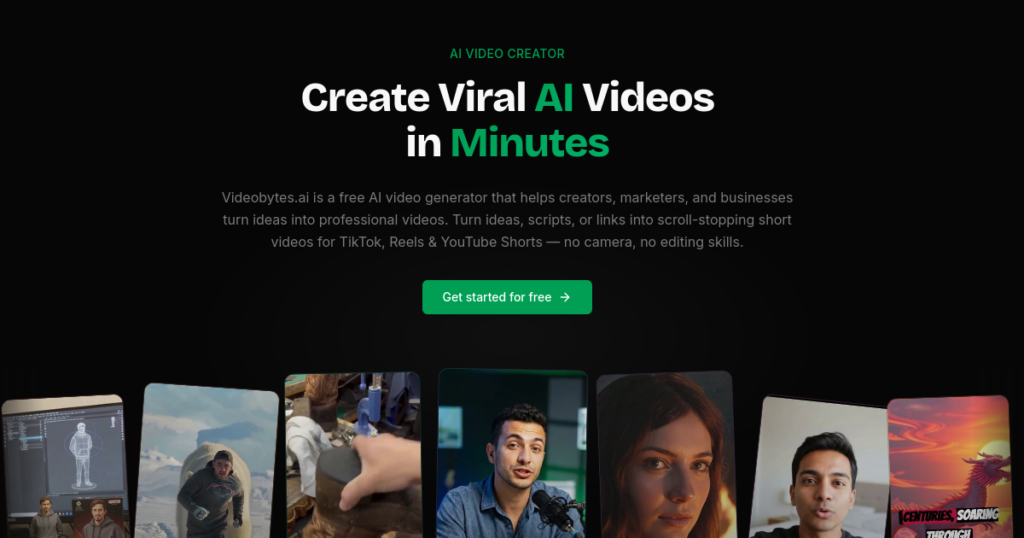
Videobytes.ai is an innovative AI video creation platform focused on automating the production of short-form video content. Its core function is to convert various inputs—such as scripts, images, or even basic ideas—into dynamic, professional-looking videos optimized for social media. The tool eliminates the traditional barriers of video production, such as needing cameras, advanced editing skills, or a large budget, making rapid content generation accessible to a broader audience.
Falling squarely into the category of AI video generators, Videobytes.ai specifically targets creators, marketers, and businesses aiming to produce high volumes of engaging content for platforms like TikTok, Instagram Reels, and YouTube Shorts. While the specific company behind Videobytes.ai isn’t prominently detailed, its development is clearly geared towards a streamlined, user-friendly experience for fast-paced digital content creation.
Key Features (Detailed Breakdown)
Videobytes.ai offers a focused suite of features designed to simplify and accelerate short-form video production. Here’s a closer look at its most impactful capabilities:
Script to Video
This feature is a cornerstone of Videobytes.ai, allowing users to instantly transform written scripts into dynamic video content. You simply input your text, and the AI will generate a video complete with visuals, voiceover, and captions. This is invaluable for content creators who have strong ideas but lack the time or resources for visual production, enabling them to bring narratives to life without manual editing.
Product Video Ad
For e-commerce businesses and marketers, the Product Video Ad feature is a significant asset. It enables the creation of engaging, user-generated content (UGC)-style product advertisements. These often incorporate AI avatars or dynamic visuals to showcase products effectively, making it easier to launch campaigns, A/B test creatives, and drive sales without relying on traditional, costly ad shoots.
YouTube Shorts Creator
Recognizing the demand for concise content, Videobytes.ai includes a dedicated YouTube Shorts Creator. This tool facilitates the conversion of longer YouTube videos into engaging, bite-sized Shorts. It’s perfect for YouTubers looking to repurpose existing content, expand their reach, and drive traffic back to their main channel by leveraging the Shorts format’s viral potential.
Image to Video
Static images can be brought to life with the Image to Video feature. Users can convert a series of still images into animated and engaging video sequences. This is particularly useful for visual storytelling, slideshows, or transforming static infographics and product photos into dynamic content that captures attention on social media feeds.
Auto Captions
Crucial for social media engagement, the Auto Captions feature automatically generates and burns in animated captions. These captions are optimized for platforms where many users watch videos with sound off. This not only improves accessibility but also significantly boosts watch time and comprehension, as viewers can follow the narrative even in noisy environments.
AI-Powered Spokesperson Videos
Videobytes.ai elevates professionalism with its AI-Powered Spokesperson Videos. This capability allows users to create videos featuring realistic digital avatars that fluently deliver scripts. This is ideal for explainer videos, product showcases, or educational content where a human touch is desired without the need for an actual presenter, offering a consistent and polished brand voice.
Full Creative Control (Video Editor)
While automation is key, Videobytes.ai also provides tools for customizing and fine-tuning generated videos before export. This “Full Creative Control” aspect ensures that users aren’t entirely locked into AI-generated defaults. It allows for adjustments to visuals, text, and timing, ensuring the final output aligns closely with brand guidelines and creative vision, albeit with a focus on short-form editing rather than complex, frame-by-frame manipulation.
Pricing & Plans
Videobytes.ai operates on a freemium model, making it highly accessible for new users. Its pricing structure is designed to scale with user needs, from casual creators to businesses with high volume requirements.
Free Plan
- Price: Completely Free to Start
- Key Features Included: Video generation without watermarks, standard resolution output.
- Best For Whom: Beginners, content creators testing niches, individuals with low-volume video needs, those wanting to experience the tool’s capabilities before committing.
- Limitations: Typically includes a restricted number of monthly videos and potentially fewer templates or advanced features compared to premium tiers.
A significant advantage of the free plan is the absence of watermarks on generated videos. This sets Videobytes.ai apart from many competitors that brand their free outputs, making it genuinely useful for publishing content without upfront investment.
Premium Plans (Videobytes Credits)
For users requiring more extensive features, higher quality, and commercial use, Videobytes.ai offers premium plans. While specific tier details are not explicitly laid out on the official website’s pricing page, the platform mentions “Videobytes Credits” as the currency for premium features.
- Price: Reportedly starts from around $20 per month, though exact tier pricing is not publicly detailed.
- Key Features Included: Higher quality output, access to more templates, potentially more AI voice options, commercial use rights, and increased video generation capacity.
- Best For Whom: Marketers, brands, e-commerce businesses, and content creators with high-volume production needs or those requiring advanced customization and professional output.
- Guarantee: A 15-day money-back guarantee is advertised, providing a safety net for new subscribers.
- Limitations: The lack of transparent, detailed premium tier pricing on the main site can make it challenging for users to understand the full cost structure and feature set before signing up.
Users should be aware that the “credits” system often means that more complex or longer videos consume more credits, requiring careful management of usage if on a budget.
Pros and Cons
Understanding the strengths and weaknesses of Videobytes.ai is crucial for deciding if it fits your workflow.
Pros ✅
- ✅ Completely Free to Start with No Watermark: A major differentiator, allowing users to create and download AI-generated videos without branding, unlike many competitors. This lowers the barrier to entry significantly.
- ✅ Speed and Efficiency: Capable of generating a finished short video in under a minute for simple prompts, drastically reducing production time. Ideal for high-volume content strategies.
- ✅ Low Learning Curve: Designed for ease of use, enabling most users to produce their first video within minutes without needing extensive editing skills or prior video production knowledge.
- ✅ Optimized for Short-Form Content: Specifically tailored for platforms like TikTok, Instagram Reels, and YouTube Shorts, including features like built-in animated captions that align with current social media trends.
- ✅ Faceless Video Creation: Perfect for individuals or businesses who prefer not to appear on camera, facilitating content creation without personal appearance and broadening content possibilities.
- ✅ AI-Powered Spokesperson Videos: Offers the ability to incorporate realistic digital avatars, adding a professional touch without the need for human presenters or expensive talent.
- ✅ Cost Reduction: Eliminates the need for expensive equipment, studios, or complex editing software, making video production more affordable for small businesses and independent creators.
Cons ❌
- ❌ Generic B-roll and Limited Customization: Videos may feature generic stock footage, potentially making content look similar to others. The tool also offers shallow customization, lacking advanced editing options like overlays, custom transitions, or frame-accurate trims for nuanced control.
- ❌ Limited AI Voice Variety: Provides fewer voice options compared to specialized text-to-speech tools, which might limit the uniqueness and brand identity of narrations over time.
- ❌ Not Suitable for Long-Form Content: The tool is primarily designed for short-form videos and is not a good fit for producing long-form narrative content, documentary-style videos, or projects requiring fine-grained, complex editing.
- ❌ Platform Dependency: Users are largely locked into the tool’s rendering pipeline. This can limit flexibility if advanced editing in external software is desired mid-production, as exporting and re-importing might be cumbersome.
- ❌ Potential for Lack of Creativity: While efficient, relying solely on AI for video generation may lead to a lack of unique creative input and potentially monotonous outputs if not carefully managed or augmented with unique scripts.
- ❌ Limited Independent User Reviews: As of early 2026, there is very limited independent user feedback available (e.g., only one review on Trustpilot). This makes it challenging to gauge widespread user sentiment and long-term satisfaction.
Real-World Use Cases
Videobytes.ai shines in several specific scenarios, making it a valuable asset for various professionals.
If you’re a Content Creator or YouTuber…
You can rapidly produce a high volume of faceless short-form content for TikTok, Instagram Reels, and YouTube Shorts. This is ideal for niche channels focused on facts, tutorials, or compilations where personal appearance isn’t required. You can quickly test different video concepts and scripts to see what resonates with your audience, boosting engagement and subscriber growth.
If you’re a Marketer or Brand Manager…
You can quickly generate numerous product video ads in a UGC (User-Generated Content) style without needing a production team. This allows for rapid A/B testing of various ad creatives, helping you optimize campaigns for better conversion rates and lower acquisition costs. The AI-powered spokesperson videos can also be used for quick announcements or explainer content.
If you’re an E-commerce Store Owner or Dropshipper…
You can create compelling product videos for your listings and social media ads in minutes. Instead of hiring videographers or spending hours editing, Videobytes.ai allows you to turn product images and descriptions into engaging video showcases that highlight features and benefits, driving more traffic and sales to your online store.
If you’re an Educator or Coach…
You can transform complex course material or training modules into digestible, engaging short videos. These can be used for micro-learning, social media teasers for your courses, or quick educational tips. The auto-captions ensure accessibility, and the speed of creation means you can focus more on content development than video production.
How It Compares to Alternatives
The AI video generation market is growing, and Videobytes.ai faces competition from several established players. Here’s how it stacks up against some top alternatives:
Videobytes.ai vs. Synthesia
- Videobytes.ai: excels in generating quick, faceless short-form content with a focus on social media virality. It offers a truly free, watermark-free option and prioritizes speed and ease of use for high-volume output.
- Synthesia: is a more premium tool known for professional and business-related videos, offering highly realistic AI avatars and support for over 130 languages. It’s often used for corporate presentations, training, and complex explainer videos, but comes with a significantly higher price tag and a steeper learning curve for advanced features. Synthesia offers deeper customization for avatars and branding.
Videobytes.ai vs. HeyGen
- Videobytes.ai: stands out for its specific niche in faceless, short-form content, offering simplicity and speed for creators who need to produce a lot of social media-ready videos without appearing on camera.
- HeyGen: is another powerful AI video generator often highlighted for marketing and multilingual video creation. It offers a broader range of AI avatar styles and more robust editing capabilities within its platform, catering to a wider array of professional video needs beyond just short-form, but its free tier is more restrictive.
Videobytes.ai vs. Pictory
- Videobytes.ai: focuses on converting various inputs (scripts, images) into dynamic short videos, with a strong emphasis on social media optimization and faceless content.
- Pictory: specializes in blog-to-video automation, excelling at converting written content (articles, scripts) into video with stock footage and voiceovers. While it can create short videos, its primary strength lies in repurposing existing text content efficiently, and its video style might be more geared towards explainer or informational content rather than viral social media clips.
Videobytes.ai vs. CapCut
- Videobytes.ai: is a web-based AI generator that automates much of the video creation process from text or images, ideal for those who want quick, hands-off video production.
- CapCut: is a popular free video editing app, particularly strong for mobile-first content creation. While it now offers AI features, it’s primarily a manual editor that requires more user input for editing, transitions, and effects. It’s excellent for fine-grained control on mobile but less about automated generation.
Who Should (and Shouldn’t) Use This Tool?
To help you make an informed decision, here’s a clear breakdown of who will benefit most from Videobytes.ai and who might find it less suitable.
Best for:
- Content Creators: Especially those running faceless channels on TikTok, Instagram Reels, or YouTube Shorts who need to produce content rapidly.
- Small Businesses & Marketers: Looking to generate high volumes of social media ads or promotional videos quickly and cost-effectively, particularly for A/B testing.
- E-commerce & Dropshippers: Needing to create engaging product video ads without significant production overhead.
- Beginners in Video Creation: Individuals new to video editing who need an intuitive tool to get started without a steep learning curve.
- Budget-Conscious Creators: Those who appreciate a truly free, watermark-free starting point for video production.
- Anyone Avoiding the Camera: Users who prefer to create video content without showing their face or hiring on-camera talent.
Not ideal for:
- Professional Video Editors: Who require advanced, frame-accurate editing capabilities, complex overlays, custom animations, and intricate sound design.
- Filmmakers & Documentarians: Projects requiring long-form narrative content, highly customized visual storytelling, or precise control over every aspect of production.
- Users Needing Deep Customization: Those who need unique transitions, specific brand-aligned motion graphics, or highly personalized stock footage.
- Large Production Houses: Organizations that have dedicated video teams and specialized software (e.g., Adobe Premiere Pro, DaVinci Resolve) for high-end, bespoke video projects.
- Creators Seeking Unique AI Voices: If a very broad and distinctive range of AI voice options is a critical requirement for your brand’s audio identity.
Final Verdict
Videobytes.ai carves out a compelling niche in the AI video generation space, particularly for creators and businesses focused on high-volume, short-form content for social media. Its standout feature is undoubtedly the completely free, watermark-free access, which significantly lowers the barrier to entry and allows anyone to experiment with AI video production. The tool’s emphasis on speed, ease of use, and specialized features like auto-captions and faceless video creation makes it incredibly efficient for rapid content deployment on platforms like TikTok and Instagram Reels.
However, it’s important to approach Videobytes.ai with realistic expectations. While it excels at generating quick, engaging snippets, its “full creative control” is relatively shallow compared to traditional video editors. Users seeking highly customized visuals, unique B-roll, or extensive voice variety might find its offerings somewhat generic. Despite these limitations, for its intended purpose—automating quick, social media-optimized videos without a camera—Videobytes.ai is a robust and highly accessible solution.
For anyone looking to scale their short-form video output, test new content ideas quickly, or create engaging ads without a large budget or complex skills, Videobytes.ai offers substantial value. It’s a solid choice for efficiency and accessibility.
Overall Rating: 8.2/10
Videobytes.ai earns a high rating for its user-friendliness, impressive speed, and particularly its generous free tier. It loses points for limited deep customization and the generic nature of some outputs, which might put a “hard ceiling on growth” for serious, long-term channels if not supplemented with unique scripts and careful content strategy.
Ready to try creating viral short-form videos with AI?
FAQ
What kind of videos can I create with Videobytes.ai?
Videobytes.ai specializes in creating short-form videos optimized for platforms like TikTok, Instagram Reels, and YouTube Shorts. You can generate videos from scripts, images, or even convert longer YouTube videos into Shorts. It’s ideal for product ads, educational snippets, and faceless content.
Is Videobytes.ai truly free to use?
Yes, Videobytes.ai offers a “completely free to start” plan that allows you to generate and download videos without watermarks. This free plan typically comes with limitations on the number of monthly videos and resolution, but it’s a generous offering compared to many competitors.
Does Videobytes.ai support AI-powered spokespersons?
Yes, one of its key features is the ability to create videos featuring realistic AI-powered spokespersons or digital avatars. This allows you to deliver scripts professionally without needing a human presenter on camera.
How does Videobytes.ai compare to InVideo or CapCut?
Videobytes.ai is more focused on automated, AI-driven generation of short-form videos from text or images. InVideo is an all-in-one video creation platform with more manual editing capabilities and templates, while CapCut is primarily a mobile-first video editing app with some AI features, requiring more hands-on editing for fine control.
Can I use Videobytes.ai for long-form video content?
No, Videobytes.ai is specifically designed for short-form video content, typically under a few minutes in length. It is not suitable for creating long-form narrative videos, documentaries, or projects that require extensive, complex editing and storytelling.
Are there any hidden costs with Videobytes.ai?
While there’s a generous free plan, premium features and higher usage volumes are handled through “Videobytes Credits,” which require payment. Specific details on premium plan pricing are not always transparently listed on the public site, so users should be prepared to explore the pricing within the platform for full clarity on costs beyond the free tier.