Tired of Constant Tab-Switching for AI Assistance? Tryclico Claims to End It All.
In the demanding world of digital work, context switching is a productivity killer. Whether you’re drafting an email, researching a topic, or generating creative content, jumping between your primary application and a separate AI tool fragments your focus and wastes valuable time. This is precisely the problem **Tryclico** aims to solve by embedding powerful AI assistance directly into your workflow.
In this comprehensive review, we’ll explore Tryclico’s core features, dissect its pricing structure, weigh its genuine pros and cons, and evaluate its real-world utility. You’ll learn whether this AI assistant truly delivers on its promise of seamless, contextual intelligence across your browser and desktop applications.
What is Tryclico?
Tryclico is an advanced AI assistant designed to integrate seamlessly into a user’s digital environment, primarily functioning as a **Chrome extension, Mac desktop application, and web interface**. Its core purpose is to provide immediate, contextual AI support for a wide range of tasks, eliminating the need to constantly switch between different AI platforms or copy and paste information.
Developed to empower knowledge workers, professionals, and students, Tryclico falls into the category of a **multi-modal AI productivity tool**. It offers a comprehensive suite of AI-powered capabilities, including deep web research, long-form content drafting, summarization, and high-fidelity image and video generation. Crucially, it leverages various leading AI models, such as **Claude, GPT, Gemini, Kimi, and Grok**, to deliver diverse and high-quality responses tailored to specific user needs.
The tool’s strength lies in its ability to operate directly within existing workflows, providing assistance in virtually any textbox across popular SaaS platforms like Gmail, Notion, Salesforce, and LinkedIn, without disrupting the user’s focus.
Key Features: A Detailed Breakdown
Tryclico stands out with a robust set of features designed to make AI assistance truly integrated and contextual. Here’s a closer look at its most impactful capabilities:
AI Studio for Deep Research
Imagine needing to research a complex topic without leaving your current document. Tryclico’s AI Studio makes this a reality. It can conduct **multi-step web research**, intelligently open relevant pages, and cross-reference new findings with your existing files. The result is a **cited, comprehensive answer** delivered directly within your workspace.
This feature is critical for academics, content creators, and business analysts who often spend hours gathering and synthesizing information. Instead of manually searching, opening multiple tabs, and compiling notes, Clico automates much of this process, providing a curated summary with sources.
High-Fidelity Image & Video Generation
Beyond text, Tryclico also ventures into creative AI. Users can **generate high-fidelity images and videos** directly from text prompts or by providing visual references within the chat interface. A significant advantage here is that the final outputs come with **no watermarks**, making them immediately usable for professional or personal projects.
For marketers, designers, or social media managers, this capability streamlines content creation. You can conceptualize a visual, describe it to Clico, and get a usable asset without switching to a separate image generation tool, saving both time and potential subscription costs for other services.
Contextual Writing Assistance
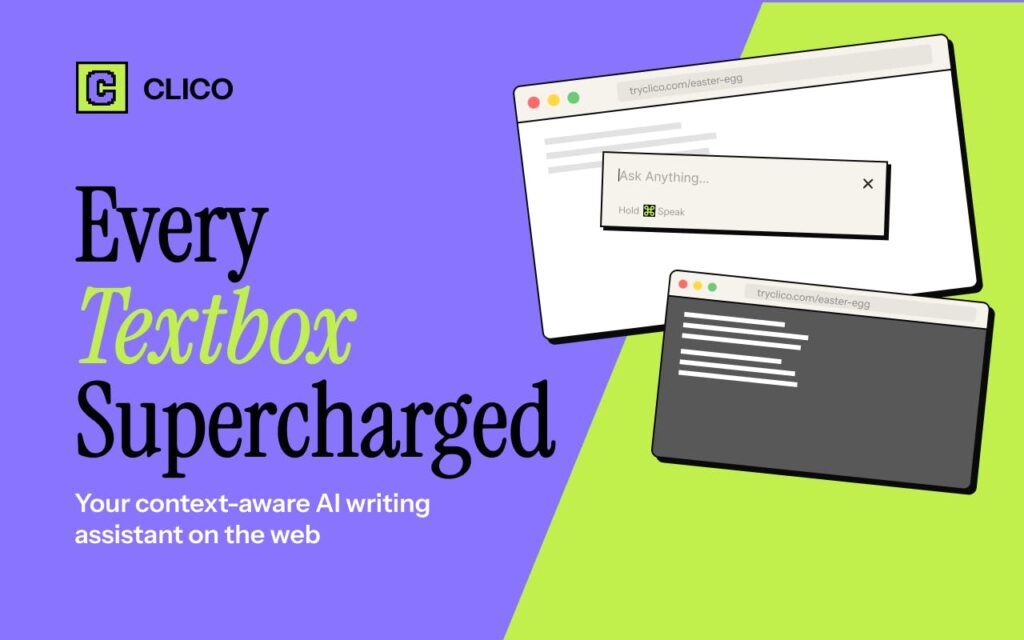
This is arguably Tryclico’s most powerful and ubiquitous feature. The tool integrates into **virtually any textbox** across a vast array of SaaS platforms, including Gmail, Notion, Salesforce, LinkedIn, and more. It offers **real-time drafting, rewriting, summarization, and dictation** without forcing you to leave your current application.
Whether you’re composing an email, drafting a report, or writing a social media post, Clico understands the surrounding text and provides relevant suggestions or completions. This eliminates the “copy-paste-switch” cycle common with standalone AI chatbots, maintaining your flow and boosting efficiency significantly.
AI Personas (“Masters”)
To ensure AI responses are tailored and effective, Tryclico introduces **eight predefined expert roles, known as “Masters.”** These include personas like Deep Research Analyst, Marketing Strategy Master, or Creative Writer. Each Master tailors the focus, tone, and approach of the AI’s responses, making the output highly relevant to the task at hand.
Furthermore, users aren’t limited to these presets; they can **set custom instructions** to create their own specialized AI personas. This system drastically reduces the need for extensive prompt engineering, allowing users to achieve desired outputs more quickly and consistently across various domains.
Multi-Surface Access
True productivity often requires flexibility across different devices and platforms. Tryclico addresses this by offering a **single account accessible via its Chrome extension, Mac desktop app, and web interface**. This ensures that you can pick up conversations and continue tasks exactly where you left off, regardless of the device or application you’re using.
This seamless continuity is a major benefit for professionals who move between desktop work and browser-based tasks throughout their day. The ability to maintain context and access AI assistance everywhere you work enhances overall productivity and reduces friction.
Page Summarization & Highlight Search
Information overload is a constant challenge. Tryclico helps by allowing users to **quickly summarize entire web pages** with a single click. Beyond full page summaries, you can also **select specific text to get explanations or quick answers** without needing to open new tabs or perform separate searches.
This feature is invaluable for students reviewing research papers, professionals quickly grasping the essence of a long article, or anyone needing to extract key information efficiently. It streamlines the consumption of digital content, making it easier to digest and understand.
Reference-Based Editing
For those working with visuals, Tryclico offers an intuitive **reference-based image editing capability**. Users can upload photos and then describe the desired changes in natural language. For instance, you could instruct the AI to “alter the style to a watercolor painting,” “remove the distraction in the background,” or “replace the setting with a bustling city street.”
This feature simplifies complex image manipulations, making advanced editing accessible even to users without specialized graphic design skills. It’s a powerful tool for quick iterations and creative explorations without external software.
Pricing & Plans
Tryclico operates on a flexible **freemium model** using a credit-based system. This approach allows users to scale their usage based on their needs, from light assistance to intensive daily use.
Free Plan
- Price: Free
- Key Features Included: 200 monthly credits. Access to core AI features, including contextual writing assistance, basic research, and some image generation.
- Best for Whom: Individuals new to AI tools, users with very light AI needs, or those who want to thoroughly test Tryclico’s capabilities before committing financially. No credit card is required to start.
Pro Plan
- Price: $19.90 per month (monthly billing) or $16 per month (billed annually, saving approximately 20%).
- Key Features Included: 2,000 monthly credits. Full access to all advanced features, including deep web research, high-fidelity image and video generation, all AI Personas, and multi-surface access.
- Best for Whom: Knowledge workers, professionals, and small business owners who regularly use AI for writing, research, and content creation. It’s ideal for those who need consistent, reliable AI assistance throughout their workday.
Max Plan
- Price: Specific pricing details for the Max Plan were not readily available in our research, but it is indicated to also offer an annual billing discount.
- Key Features Included: Likely offers a significantly higher volume of monthly credits and potentially priority support or advanced team features not present in the Pro Plan.
- Best for Whom: Teams, agencies, or power users with very high AI usage requirements who need extensive credits and potentially collaborative features.
Tryclico’s credit system is transparent: more complex tasks, like deep research or image generation, consume more credits than simple text rewrites. The free plan provides a genuine opportunity to experience the tool’s practical value without any initial financial commitment.
Pros and Cons
Every tool has its strengths and weaknesses. Here’s an honest look at what Tryclico does well and where it could improve.
✅ Pros
- Seamless Browser Integration: Tryclico truly “lives where you work,” integrating directly into textboxes across a wide array of web applications. This eliminates the need for constant context switching, significantly boosting productivity.
- Exceptional Contextual Awareness: The AI can read and understand the content of the webpage or document you’re currently viewing, ensuring that its assistance is hyper-relevant and precise.
- Versatile Multi-Modal AI Capabilities: It consolidates deep web research, advanced content generation, and high-fidelity image/video creation into a single, cohesive tool, reducing reliance on multiple AI services.
- Effective Persona System (“Masters”): The predefined expert roles and custom instruction capabilities allow users to quickly tailor AI responses, minimizing the effort required for prompt engineering and ensuring consistent output quality.
- No Watermarks on Generated Media: A significant advantage for creators and marketers, generated images and videos can be downloaded and used professionally without any distracting watermarks.
- Generous Free Plan: Offering 200 monthly credits, the free plan provides a substantial opportunity for users to test the tool’s practical value and integrate it into their workflow before making a financial commitment.
- Multi-Platform Accessibility: With a Chrome extension, a dedicated Mac desktop app, and a web interface, users can access their Clico account and continue conversations consistently across different work environments.
❌ Cons
- Limited Workflow Automation: While excellent for individual tasks, Tryclico shows limitations when it comes to sophisticated workflow automation or building complex, multi-step trigger/action chains beyond its immediate contextual assistance.
- Lack of Deep Third-Party Integrations: Our research did not identify visible connections to third-party business systems like advanced CRM platforms, dedicated document management tools, or project management software APIs for deeper, automated data exchange.
- Potential Privacy Concerns with Browser Extension: By its very design, the browser extension requires access to page content to provide contextual assistance. Users should carefully review Tryclico’s data privacy practices and consider the implications of granting such access.
- Browser-Specific Optimizations: Some features or optimal performance might be more pronounced or exclusively available within Chromium-based browsers, potentially leading to a less consistent experience on other browser types.
- Data Privacy Details Could Be Stronger: While functional, some user reviews and analyses suggest that the level of detail provided regarding data privacy practices could be more explicit and comprehensive to build greater user trust.
Real-World Use Cases
Tryclico’s contextual AI capabilities make it incredibly versatile across various professional roles. Here are a few scenarios where it truly shines:
If you’re a Content Creator or Marketer…
Imagine you’re drafting a blog post in WordPress or Notion. With Tryclico, you can highlight a paragraph and instantly ask it to “rewrite this in a more engaging, SEO-friendly tone.” Need a compelling image for your social media campaign? Describe it directly in the Clico chat, and it generates high-fidelity, watermark-free visuals. If you’re researching a new topic for an article, the AI Studio can conduct deep web research, summarize findings, and cite sources, all without ever leaving your drafting environment.
If you’re a Sales Professional or Customer Support Agent…
When responding to customer inquiries in Salesforce or composing an email to a lead in Gmail, Tryclico can provide instant, context-aware assistance. Highlight a customer’s question and ask for a polite, comprehensive answer. Or, if you’re drafting a follow-up email, Clico can help refine your messaging, summarize previous interactions, or even suggest personalized content based on the customer’s profile, ensuring clarity and professionalism in every communication.
If you’re a Researcher or Student…
Working on a research paper or academic project often involves sifting through vast amounts of information. Tryclico can summarize lengthy academic articles directly in your browser, helping you quickly grasp key arguments. If you encounter an unfamiliar term or concept, simply highlight it and ask Clico for an explanation. The AI Studio can also perform multi-step research, cross-referencing information from various sources and your own uploaded files, providing cited answers to complex questions, streamlining your literature review process.
If you’re a Project Manager or Team Leader…
When updating project notes in Notion or drafting a status report, Tryclico can help you quickly summarize meeting minutes, rephrase unclear instructions, or even generate bullet points for key takeaways. If you need to communicate a complex strategy, you can leverage the “Marketing Strategy Master” persona to refine your language and ensure your message is clear, concise, and impactful for your team.
How It Compares to Alternatives
The AI assistant market is growing rapidly. Here’s how Tryclico stacks up against some popular alternatives:
Tryclico vs. MaxAI.me & Monica AI
Both MaxAI.me and Monica AI are prominent browser extensions that supercharge textboxes with AI, similar to Tryclico. They excel at quick text generation, summarization, and rephrasing directly within your browser.
- Where Tryclico Wins: Tryclico distinguishes itself with its **integrated multi-modal capabilities**, offering high-fidelity image and video generation (without watermarks) and a more robust “AI Studio” for deep, cited web research. Its “Masters” persona system also provides a more structured way to tailor AI responses. Monica AI, however, does offer a broad set of extra features including PDF analysis and translation, which Tryclico doesn’t explicitly highlight.
- Where Competitors are Better: MaxAI.me and Monica AI might have a slight edge in sheer breadth of simple, quick text manipulation features or specific niche tools (like Monica’s PDF analysis). The credit system of Tryclico might feel more restrictive for users accustomed to unlimited usage from some competitors, though Tryclico’s credits are for more advanced tasks.
Tryclico vs. Wordtune & Grammarly
Wordtune and Grammarly are primarily focused on writing enhancement, grammar, style, and rephrasing.
- Where Tryclico Wins: Tryclico offers a far broader range of functionalities beyond just writing. It combines writing assistance with **deep web research, image/video generation, and a persona system**, making it a more comprehensive AI assistant. While it helps with writing, it’s not its sole focus.
- Where Competitors are Better: For pure **grammar, spelling, style correction, and sentence rephrasing**, Grammarly and Wordtune remain highly specialized and often offer more granular suggestions and checks, particularly for academic or highly formal writing. If your primary need is flawless grammar and concise phrasing, these tools might still be superior.
Tryclico vs. ChatGPT / Claude (General-Purpose Chatbots)
ChatGPT and Claude are powerful, general-purpose AI chatbots capable of extensive text generation, summarization, and research. However, they are typically accessed via dedicated web interfaces.
- Where Tryclico Wins: Tryclico’s main advantage is **contextual integration**. It brings the power of AI directly into your workflow, eliminating the constant need to copy text, switch to a chatbot, paste, get a response, and then copy/paste back. It understands the content on your active page, leading to more relevant and immediate assistance. It also integrates multi-modal features like image/video generation, which standalone chatbots might not offer natively.
- Where Competitors are Better: For **open-ended brainstorming, complex multi-turn conversations without specific application context, or very long-form, unconstrained content generation**, general-purpose chatbots like ChatGPT or Claude might still feel more natural and powerful due to their dedicated chat interfaces and often larger context windows for pure conversational flow.
Who Should (and Shouldn’t) Use This Tool?
Best for:
- Knowledge Workers & Professionals: Anyone who spends significant time in browser-based applications (Gmail, Notion, Salesforce, LinkedIn) and needs an “always-on” AI writing, research, and content creation assistant.
- Content Creators & Marketers: Ideal for those who regularly draft articles, social media posts, emails, and require quick image/video generation without watermarks.
- Researchers & Students: Excellent for summarizing long documents, performing cited web research, and getting contextual explanations directly within their study materials.
- Productivity Enthusiasts: Users who prioritize minimizing context switching and want to integrate AI seamlessly into their existing digital workflows.
- Mac Users: The dedicated Mac desktop application provides a consistent experience for those on Apple’s ecosystem.
Not ideal for:
- Users Needing Deep Workflow Automation: If your primary requirement is to build complex, multi-step automations that integrate deeply with various business systems (CRMs, ERPs, project management tools via APIs), Tryclico’s current capabilities might be too limited.
- Users with Extreme Privacy Concerns: While Tryclico functions by accessing page content, users who are highly sensitive about browser extension permissions and data access might need to conduct a thorough personal review of its privacy policy.
- Users Looking for a Standalone Image/Video Editor: While it generates media, Tryclico is not a full-fledged image or video editing suite. Its capabilities are for generation and basic reference-based edits, not advanced post-production.
- Users Who Prefer Unlimited AI Usage: The credit-based system, while generous, might feel restrictive for power users accustomed to unlimited text generation from certain subscription-based AI chatbots.
Final Verdict
Tryclico enters a crowded AI market with a clear, compelling value proposition: **contextual AI that lives where you work**. Our review confirms that it largely delivers on this promise, offering a truly seamless integration into browser-based workflows and a dedicated Mac application. The ability to perform deep web research, draft content, and even generate watermark-free images and videos without leaving your current application is a significant productivity enhancer.
The “Masters” persona system is a thoughtful addition, simplifying prompt engineering and ensuring more tailored AI outputs. For professionals constantly juggling emails, documents, and research, Tryclico minimizes the friction of context switching, allowing for a more focused and efficient workday. While it shows limitations in complex workflow automation and deep third-party integrations, its core strength lies in empowering individual tasks with intelligent, on-demand assistance.
Considering its robust feature set, effective contextual awareness, and generous freemium model, Tryclico earns a strong recommendation for knowledge workers seeking to embed AI directly into their daily routines.
Overall Rating: 8.7/10
If you’re tired of the “copy-paste-switch” cycle and want a powerful AI assistant that genuinely integrates into your workflow, Tryclico is definitely worth exploring.
Try Tryclico Today and Boost Your Productivity →
FAQ
What is Tryclico and how does it work?
Tryclico is an AI assistant that integrates into your browser (Chrome extension), Mac desktop, and web interface. It provides contextual AI help directly within textboxes across various applications, allowing you to draft, rewrite, summarize, research, and even generate images/videos without leaving your current tab or app. It works by understanding the content on your screen to provide relevant assistance.
Is there a free version of Tryclico?
Yes, Tryclico offers a Free Plan. This plan provides 200 monthly credits, which is suitable for light usage and allows users to explore its core features without requiring a credit card. It’s an excellent way to test the tool’s capabilities before committing to a paid plan.
What kind of AI models does Tryclico use?
Tryclico leverages multiple leading AI models to power its features, including Claude, GPT, Gemini, Kimi, and Grok. This multi-model approach allows it to provide diverse, high-quality, and tailored responses for various tasks.
Can Tryclico generate images and videos?
Yes, Tryclico can generate high-fidelity images and videos from text prompts or visual references directly within its chat interface. A key benefit is that all generated media comes without watermarks, making them immediately usable for professional or personal projects.
How does Tryclico handle my data and privacy?
Tryclico, by nature of its browser extension, accesses page content to provide contextual assistance. While specific detailed privacy policies should always be reviewed on their official site, users should be aware of the permissions required for such tools. It’s recommended to consult Tryclico’s official privacy policy for the most current and comprehensive information regarding data handling.
How does Tryclico compare to ChatGPT or other AI chatbots?
The primary difference is Tryclico’s deep contextual integration into your workflow. While ChatGPT and other chatbots are powerful for general text generation and conversation, they typically require you to switch tabs and copy/paste content. Tryclico brings AI directly to your textboxes and applications, understanding your current context, which significantly reduces friction and context switching.