In today’s demanding digital environment, the speed at which you can translate thoughts into text directly impacts productivity. Manual typing often creates a bottleneck, slowing down communication, content creation, and documentation across various applications.
This is precisely the problem that Wispr Flow aims to solve. This AI-powered voice dictation application allows users to convert spoken words into clean, polished text across virtually any application on Mac, Windows, iOS, and Android devices.
What is Wispr Flow?
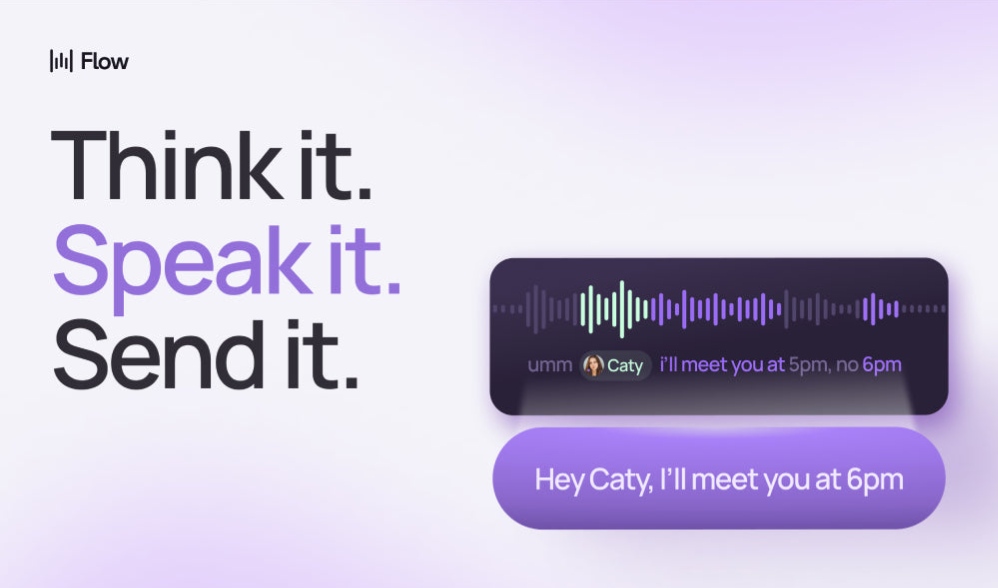
Wispr Flow is an advanced AI voice dictation application designed to significantly enhance writing speed and efficiency. It works by capturing your natural speech through a keyboard shortcut and then processing it via cloud-based AI models. The result is real-time transcription that not only converts words but also intelligently cleans up filler words, corrects grammar, applies smart punctuation, and formats text based on context.
Unlike many dictation tools confined to specific applications, Wispr Flow integrates seamlessly at a system level. This means you can dictate emails, documents, code, messages, and notes across virtually any application—from your email client to a specialized code editor—without the need for manual copy-pasting or switching between tools. Its core mission is to make communication and content creation faster and more effortless than traditional typing.
Key Features (Detailed Breakdown)
Wispr Flow offers a robust set of features that go beyond basic speech-to-text. Here’s a closer look at its most impactful capabilities:
Effortless Voice Dictation Across Platforms
At its core, Wispr Flow enables users to dictate text and commands into any application. It works system-wide across macOS, Windows, iOS, and Android. This universal compatibility is a significant advantage, as it eliminates the frustration of context-switching. Users report writing up to four times faster than typing, with speeds potentially reaching 220 words per minute compared to an average typing speed of 45 words per minute. This speed increase directly translates to substantial productivity gains for anyone who produces a lot of written content.
AI-Powered Auto-Edits and Cleanup
Beyond simple transcription, Wispr Flow employs advanced AI to automatically refine your dictated speech. It intelligently removes common filler words like “um” and “uh,” corrects grammatical errors, and applies appropriate punctuation in real-time. This automated cleanup significantly reduces the need for manual editing after dictation, delivering a more polished and professional output from the start. This feature is crucial for maintaining a high standard of written communication with minimal effort.
Personalized Writing Style
Wispr Flow’s AI isn’t static; it adapts to your unique voice and writing style over time. As you use the tool, it learns your common phrases, sentence structures, and preferred tone. This personalization helps the application produce more natural and coherent sentences, minimizing the “robotic” feel that can sometimes occur with generic AI transcription. The result is text that sounds genuinely like you, leading to fewer corrections and a more seamless dictation experience.
Multilingual Support with Code-Switching
For a global user base, multilingual capabilities are essential. Wispr Flow supports over 100 languages (currently in beta) and offers seamless code-switching. This means you can switch between languages mid-sentence, and the AI will automatically detect and transcribe the correct language. This feature is particularly valuable for individuals or teams working in diverse linguistic environments, making cross-cultural communication more fluid and efficient.
Enterprise-Grade Security and Compliance
For professionals handling sensitive information, security is paramount. Wispr Flow boasts impressive certifications, including HIPAA compliance for healthcare use cases, along with SOC 2 Type II and ISO 27001 certifications. These attestations confirm the tool’s adherence to stringent security and data privacy standards, making it a viable option for enterprise and regulated environments where data protection is non-negotiable.
Pricing & Plans
Wispr Flow offers a straightforward pricing structure, though detailed breakdowns for specific tiers beyond the trial are not fully public. Here’s what we know:
14-Day Free Trial
- Price: Free for 14 days
- Key features included: Access to most core dictation features, allowing users to experience its speed and AI cleanup capabilities.
- Best for whom: Individuals and professionals looking to test the waters and see if voice dictation fits their workflow before committing to a subscription.
Paid Subscription
- Price: $15 per month
- Key features included: Full access to core dictation, AI auto-edits, personalized writing style, custom dictionary, and privacy mode.
- Premium Features: Command Mode, premium languages (likely part of a “Pro” tier), and priority support are noted as requiring a “Pro” tier, though specific pricing for this tier isn’t detailed.
- Best for whom: Regular users who rely on dictation for a significant portion of their daily writing, professionals in various fields (content creation, legal, medical, development), and individuals seeking advanced AI editing and cross-platform consistency.
At $15 per month, Wispr Flow positions itself as one of the pricier options in the market. While the value proposition lies in its universal integration and advanced AI, potential users should weigh this cost against their usage frequency and the productivity gains they expect.
Pros and Cons
Understanding both the strengths and weaknesses of Wispr Flow is crucial for an informed decision.
Pros ✅
- ✅ Significant Speed Increase: Users can write up to 4x faster than typing, with reported speeds around 220 words per minute.
- ✅ High Accuracy: Offers high transcription accuracy, independently tested at around 97.2% on standard English audio in quiet environments. It also personalizes to your writing style, reducing editing time.
- ✅ Universal Application Integration: Works seamlessly across almost any text field on Mac, Windows, iOS, and Android, eliminating context-switching.
- ✅ Advanced AI Cleanup: Automatically removes filler words, corrects grammar and punctuation, and formats text professionally in real-time.
- ✅ Context-Aware Formatting: Adjusts tone, punctuation, and formality based on the specific application (e.g., email vs. code editor).
- ✅ Robust Security & Compliance: Offers enterprise-ready security with SOC 2 Type II, ISO 27001, and HIPAA certifications, suitable for regulated industries.
- ✅ Multilingual Capabilities: Supports over 100 languages with seamless code-switching and automatic language detection.
- ✅ Command Mode for Editing: Allows for voice-based editing and manipulation of text, such as summarizing or translating.
- ✅ Improved Workflow: Reduces mental friction, allowing users to capture thoughts instantly and maintain momentum.
Cons ❌
- ❌ Cloud-Only Processing: Requires an internet connection and processes all voice data in the cloud, raising privacy concerns for sensitive work and meaning no offline mode.
- ❌ High Resource Usage on Windows: The Windows app, built on Electron, reportedly uses around 800 MB of RAM and 8% CPU even when idle, potentially affecting performance on older machines and causing target applications to freeze.
- ❌ Slower Startup Times: Some users report noticeable slower startup times for the application.
- ❌ Pricier Option: At $15/month, it is considered one of the more expensive dictation tools compared to some alternatives or built-in options.
- ❌ Reliability Complaints: A Trustpilot rating of 2.7/5 indicates recurring complaints about reliability degrading after the trial period.
- ❌ Latency: While generally fast, end-to-end latency can feel closer to 1 to 2 seconds for word-by-word feedback, which can be noticeable for some users.
- ❌ Noisy Environment Performance: Can struggle to maintain high accuracy in noisy or less-than-ideal acoustic environments.
Real-World Use Cases
Wispr Flow shines in scenarios where rapid, accurate, and polished text input is critical across diverse platforms.
For Content Creators and Digital Marketers
If you’re a blogger, copywriter, or social media manager, Wispr Flow can dramatically accelerate your content pipeline. Dictate blog posts, email newsletters, social media captions, or ad copy directly into your preferred CMS or marketing platform. The AI cleanup ensures your output is professional, saving significant editing time and allowing you to publish content faster.
For Developers and Programmers
If you’re a developer working in an IDE, Wispr Flow offers a dedicated workflow to narrate code context or prompt AI coding tools more efficiently. Instead of typing out lengthy comments or complex prompts, you can speak them, keeping your hands free for coding while still documenting your work or interacting with AI assistants. This can streamline documentation and accelerate AI-assisted coding.
For Students and Academics
If you’re a student taking notes in lectures or an academic writing papers, Wispr Flow can capture your thoughts and research rapidly. Dictate essays, research notes, or study summaries directly into your document editor. The speed and accuracy help you keep up with complex ideas and focus on the content rather than the mechanics of typing.
How It Compares to Alternatives
The AI voice dictation market has several players, each with unique strengths. Here’s how Wispr Flow stacks up against some notable alternatives:
Wispr Flow vs. Willow Voice
- Wispr Flow: Offers universal cross-platform integration (Mac, Windows, iOS, Android) and advanced AI for real-time cleanup and context-aware formatting. Its “Command Mode” provides unique voice-first editing capabilities. However, it’s cloud-only and has higher reported resource usage on Windows.
- Willow Voice: Positioned as a direct competitor, emphasizing 3x better accuracy than built-in tools and sub-200 millisecond processing speed. A key differentiator is its privacy-focused local processing, which may appeal to users with strict data security requirements. This means it doesn’t send your voice data to the cloud.
- Verdict: Wispr Flow wins on broader platform compatibility and advanced AI editing features, while Willow Voice might be preferred for those prioritizing absolute privacy and local processing.
Wispr Flow vs. Otter.ai
- Wispr Flow: Focused on real-time, system-wide dictation for content creation and communication across all applications. Its strength is transforming speech into polished text that’s ready for immediate use.
- Otter.ai: Primarily known for AI meeting transcription and note-taking. It excels at recording and transcribing entire conversations, identifying speakers, and generating summaries. While it offers a free plan, its real-time dictation capabilities aren’t as integrated or universal as Wispr Flow’s.
- Verdict: Choose Wispr Flow for direct, real-time input into any app. Choose Otter.ai for transcribing meetings and generating summaries from recorded audio.
Wispr Flow vs. SuperWhisper
- Wispr Flow: Cloud-based, subscription model, offers universal integration and advanced AI processing for cleanup and editing.
- SuperWhisper: A strong competitor that runs locally on your device, offering a more privacy-friendly option. It often comes with a one-time payment model, which can be more cost-effective in the long run than a monthly subscription. However, local processing might mean it doesn’t have the same level of cloud-powered AI refinement or multilingual breadth as Wispr Flow.
- Verdict: Wispr Flow is for those who prioritize advanced cloud AI and universal access. SuperWhisper is ideal for privacy-conscious users who prefer a one-time purchase and local processing, potentially sacrificing some of the advanced cloud-AI features.
Who Should (and Shouldn’t) Use This Tool?
Best for:
- ✅ Professionals who generate a high volume of written content daily across multiple devices (Mac, Windows, iOS, Android).
- ✅ Content creators, marketers, and writers looking to significantly increase their writing speed and reduce editing time.
- ✅ Developers who want to narrate code comments or prompts for AI coding assistants.
- ✅ Individuals in regulated industries (healthcare, legal) requiring HIPAA, SOC 2 Type II, and ISO 27001 compliant dictation.
- ✅ Users who value advanced AI features like automatic filler word removal, grammar correction, and context-aware formatting.
- ✅ Anyone who frequently works in multiple languages and needs seamless code-switching capabilities.
- ✅ Users who prefer a voice-first approach to text editing and manipulation via “Command Mode.”
Not ideal for:
- ❌ Users with strict privacy requirements who prefer local-only processing of their voice data.
- ❌ Individuals with older Windows machines where the reported high RAM and CPU usage might cause performance issues.
- ❌ Those who primarily need transcription for meetings or long audio recordings (Otter.ai might be a better fit).
- ❌ Budget-conscious users seeking a free or significantly cheaper dictation solution.
- ❌ Users who frequently work in extremely noisy environments, as accuracy can degrade.
- ❌ Anyone who requires an offline dictation mode.
Final Verdict
Wispr Flow stands out as a powerful and highly integrated AI voice dictation tool, particularly for users operating across multiple platforms (Mac, Windows, iOS, Android). Its ability to convert speech into polished, context-aware text at speeds up to four times faster than typing is genuinely impressive. The advanced AI cleanup, personalized writing style, multilingual support, and unique Command Mode truly set it apart from basic dictation tools, positioning it as a comprehensive solution for productivity.
However, it’s not without its drawbacks. The cloud-only processing raises legitimate privacy concerns for some, and the reported high resource usage on Windows machines is a significant performance consideration. At $15 per month, it’s a premium offering, and users should weigh its benefits against the cost and potential technical limitations.
Despite these cons, for professionals who demand high-speed, accurate, and intelligently processed voice input across their entire digital ecosystem, Wispr Flow offers a compelling value proposition. Its enterprise-grade security certifications further bolster its appeal for those in sensitive fields. If you’re looking to fundamentally change how you interact with text and dramatically boost your writing efficiency, Wispr Flow is definitely worth considering.
Overall Rating: 8.5/10 – Wispr Flow earns a high rating for its exceptional accuracy, universal integration, and advanced AI features, which collectively deliver significant productivity gains. While its cloud-only nature and Windows resource demands are notable drawbacks, its strengths make it a top contender in the AI dictation space.
Boost Your Productivity with Wispr Flow →
FAQ
What is Wispr Flow and how does it work?
Wispr Flow is an AI-powered voice dictation app that converts your spoken words into text in real-time across Mac, Windows, iOS, and Android applications. It uses cloud-based AI to automatically clean up filler words, correct grammar, apply punctuation, and format text based on context, allowing you to “type” up to four times faster.
Is Wispr Flow secure and private?
Wispr Flow is certified with HIPAA, SOC 2 Type II, and ISO 27001, making it suitable for professional and healthcare use cases. However, it processes all voice data in the cloud, which means it requires an internet connection and may raise privacy concerns for users with extremely sensitive data who prefer local-only processing.
Does Wispr Flow support multiple languages?
Yes, Wispr Flow supports over 100 languages (in beta) with advanced code-switching capabilities and automatic language detection. This allows users to seamlessly dictate in multiple languages within the same session.
How accurate is Wispr Flow compared to other dictation tools?
Independent testing shows Wispr Flow offers high transcription accuracy, around 97.2% for standard English audio in quiet environments. Its AI also personalizes to your writing style over time, further enhancing accuracy and reducing editing needs.
Is there a free trial for Wispr Flow?
Yes, Wispr Flow offers a 14-day free trial that allows users to experience its core features and assess its suitability for their workflow before committing to the monthly subscription.
Can Wispr Flow be used offline?
No, Wispr Flow requires an active internet connection as it processes all voice data through its cloud-based AI models. It does not currently offer an offline dictation mode.