What is Framer?
Framer is an AI website builder designed to help designers and creative teams build and publish professional, high-performance websites without writing any code. It began its journey as an interactive prototyping tool for UX designers, much like Figma, but has since evolved into a comprehensive platform that integrates design, content management (CMS), hosting, analytics, and artificial intelligence for full-fledged web publishing.
At its core, Framer offers a visual canvas where users can leverage AI agents to generate layouts, refine designs, manage CMS content, and even incorporate custom code for complex interactions. The platform provides an all-in-one solution, including built-in hosting, SEO optimization, and collaboration features, simplifying the entire website creation and deployment process from initial concept to a live, responsive site.
Key Features: A Detailed Breakdown
Framer offers a robust suite of features that cater specifically to modern website creation, emphasizing design flexibility and AI assistance.
AI Website Generation & Design Agents
One of Framer’s standout capabilities is its AI-powered generation. Users can generate entire site sections, full pages, or complete layouts simply from text prompts. For example, you could prompt, “Create a landing page for a SaaS product with a hero section, feature list, and testimonial area.” The AI agents work directly on the canvas to generate and refine designs, create responsive breakpoints, add effects, build reusable components, and even suggest custom code snippets.
- Why it matters: This feature dramatically accelerates the initial design phase, allowing designers to quickly iterate on ideas and build out complex structures in minutes rather than hours. It reduces repetitive tasks and provides a strong foundation for further customization.
No-Code Visual Editor

Framer provides a drag-and-drop interface that makes designing and creating interactive components intuitive, all without needing to write code. Similar to popular design tools, it offers precise control over layout, spacing, typography, colors, and interactions. Users can manipulate elements directly on the canvas, ensuring pixel-perfect designs.
- Why it matters: It offers full creative control, enabling designers to translate their exact vision into a functional website. The visual editor makes complex designs accessible and empowers anyone to build professional sites.
Content Management System (CMS)
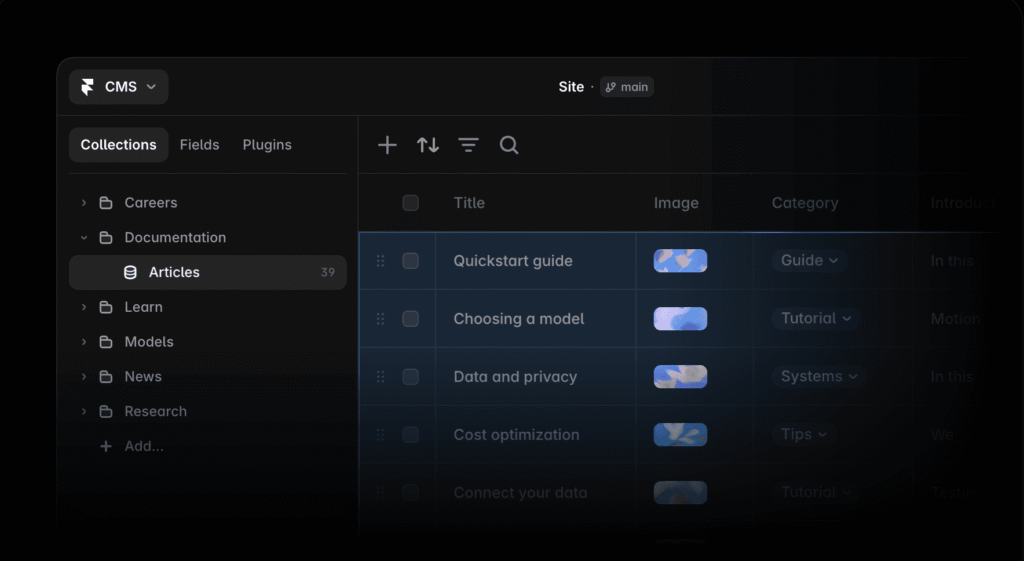
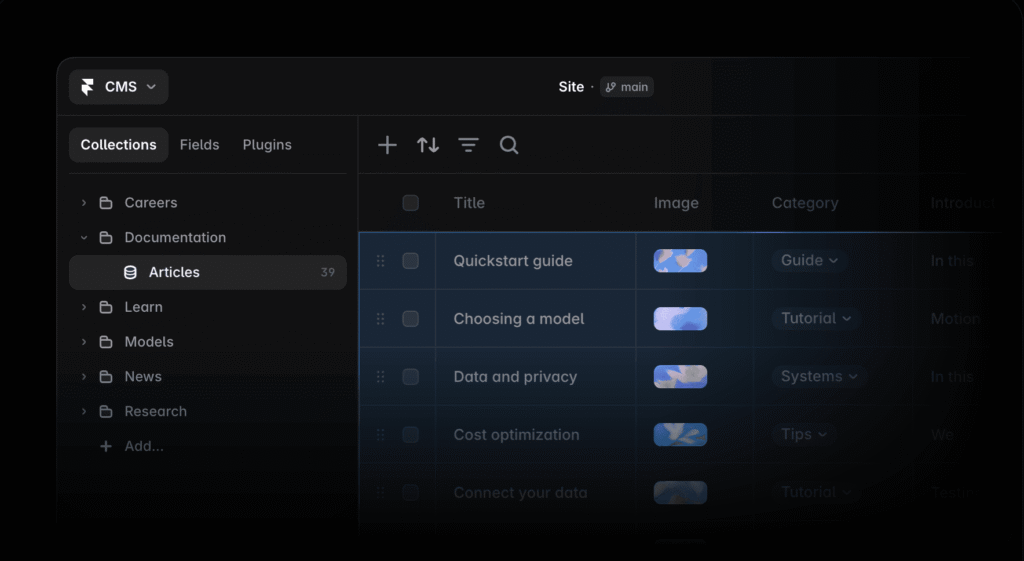
Included within Framer is a visual CMS for managing dynamic content. This is crucial for websites that require frequent updates, such as blogs, portfolios, product catalogs, or testimonial sections. The CMS agent assists in setting up, organizing, and updating content, ensuring it remains synchronized with your design. For instance, you can define a “Blog Post” collection with fields for title, author, date, and body text, then populate it visually.
- Why it matters: A built-in CMS means you don’t need external tools for content management, simplifying your workflow. It allows non-technical users to update website content easily, maintaining design consistency.
Responsive Design
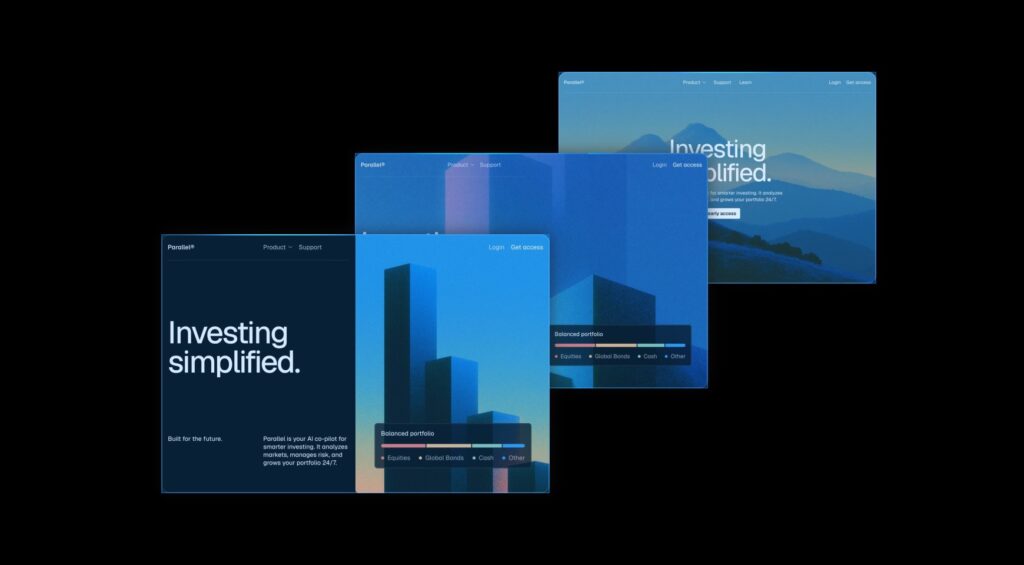
Websites built with Framer are responsive by default. This means your designs automatically adapt to look great across various screen sizes—desktops, tablets, and smartphones. Designers can specifically create and test layouts for different breakpoints, ensuring a seamless user experience regardless of the device.
- Why it matters: In today’s multi-device world, responsive design is non-negotiable for user experience and SEO. Framer handles this elegantly, saving designers significant time and effort.
Built-in Hosting & Performance Optimization
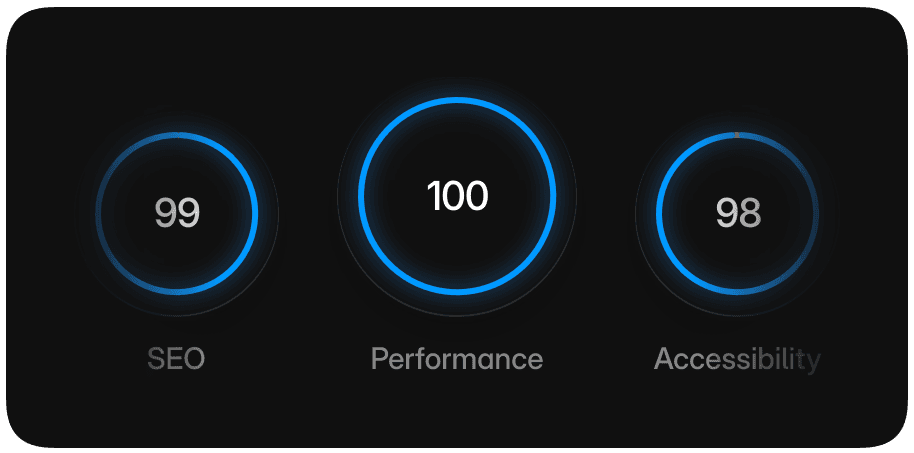
Framer takes care of website hosting automatically, eliminating the need for users to configure external hosting providers or CDN services. Crucially, it optimizes sites for fast loading times and mobile-friendliness, directly enhancing search engine optimization (SEO) and user experience. Framer sites are known for their exceptional speed, often scoring very high on Lighthouse performance tests.
- Why it matters: This integrated approach simplifies deployment, ensures high performance out of the box, and reduces technical overhead, allowing designers to focus purely on creation.
Advanced Animations & Interactions

Framer boasts a “motion-first” approach, making it easy to create dynamic, fluid animations, intricate scrolling effects, and subtle micro-interactions visually, without writing any custom code. From parallax scrolling to hover effects and page transitions, the platform offers extensive control over how elements move and respond.
- Why it matters: Engaging animations and interactions significantly improve user experience, brand perception, and overall website appeal. Framer democratizes advanced motion design, making it accessible to designers without coding skills.
Pricing & Plans
Framer offers several pricing tiers, designed to accommodate various needs from personal projects to large agencies. Note that annual billing generally provides a significant discount compared to monthly billing.
Free Plan
- Price: Free
- Key Features: Access to 10 CMS collections, 1,000 pages, 5 MB file uploads, and 500 daily AI credits (up to 1,000 per month). You can design and create templates, but custom domains require an upgrade.
- Best for: Non-commercial use, testing the platform, learning Framer’s interface, or designing personal projects without a custom domain.
Basic Plan
- Price (Annual Billing): $10/month ($120 billed annually)
- Price (Monthly Billing): $15/month
- Key Features: 30 pages, 2 CMS collections, 1,000 CMS items, 50 GB bandwidth, and up to 2 editor seats. Allows for custom domains.
- Best for: Students, freelancers, small studios, or individuals needing a professional online presence like portfolios or simple landing pages.
Pro Plan
- Price (Annual Billing): $30/month ($360 billed annually)
- Price (Monthly Billing): $45/month
- Key Features: 150 pages, 10 CMS collections, 2,500 CMS items, 100 GB bandwidth, and up to 10 editor seats. Enhanced features for collaboration and more extensive projects.
- Best for: Teams at agencies, startups, and scale-ups who require more pages, CMS items, and collaborative features for client work or growing businesses.
Scale Plan
- Price (Annual Billing Only): $100/month ($1,200 billed annually)
- Key Features: 300 pages (expandable to 500), 20 CMS collections (expandable to 40), 10,000 CMS items, 200 GB bandwidth (expandable to 2 TB), and up to 10 editor seats. Offers more robust resources and scalability.
- Best for: Larger organizations, rapidly growing businesses, or agencies managing multiple substantial client projects that demand higher limits and performance.
Enterprise Plan
- Price: Custom pricing
- Key Features: Custom limits for pages, CMS items, and bandwidth, annual billing, dedicated support, and advanced security options.
- Best for: Large enterprises and organizations with specific, high-volume requirements and dedicated support needs.
Additional Costs & Limitations
- Editor Seats: Beyond the included seats, additional editors cost $20/month each on Basic and $40/month each on Pro and Scale (when billed annually). This can add up for larger teams.
- Locales (Multi-language Support): $20/locale (yearly) or $25/locale (monthly) for Basic and Pro plans; $20/locale for Scale. This is an important consideration for global websites.
- Convert / A/B testing: $50 per 500,000 events for Pro and Scale plans.
Pros and Cons
Understanding Framer’s strengths and weaknesses is crucial for deciding if it’s the right fit for your needs.
Pros
- ✅ Exceptional Design Flexibility: Offers unparalleled visual precision and full control over layout, typography, and advanced animations without code, akin to a design tool like Figma.
- ✅ AI-Assisted Workflows: AI agents significantly speed up tasks like layout generation, content localization, copy refinement, and responsive design creation, boosting efficiency.
- ✅ Blazing Fast Performance: Framer sites are renowned for their speed, achieving high scores in performance tests due to built-in optimization and efficient hosting.
- ✅ Intuitive Interface for Designers: The clean, modern interface is highly familiar to designers, making the transition from UI/UX design to web publishing smooth and enjoyable.
- ✅ Seamless Collaboration: Supports real-time collaboration with live editing, commenting, and feedback integration, ideal for team environments.
- ✅ Integrated Ecosystem: Provides an all-in-one solution with built-in hosting, a visual CMS, robust SEO tools, and analytics, reducing reliance on multiple external platforms.
Cons
- ❌ Learning Curve for Advanced Features: While easy to start, mastering Framer’s more advanced animation capabilities, complex CMS setups, or custom code integrations can require a dedicated learning period for some users.
- ❌ Pricing Can Add Up: Costs can escalate quickly for larger teams due to per-editor seat charges, and the additional fees for multi-language support (locales) are often cited as expensive by users.
- ❌ Limited E-commerce Functionality: Framer is not designed for complex e-commerce platforms out-of-the-box. While integrations with third-party tools like Shopify or Lemon Squeezy are possible, it lacks native robust e-commerce features.
- ❌ No Native Code Export: Users cannot natively export the underlying code of their Framer sites. This can be a limitation for developers who prefer to have full control over the codebase outside the platform.
- ❌ Occasional Performance Glitches: Some users report that the editor can occasionally slow down, especially when working on very large or complex projects with numerous assets and interactions.
Real-World Use Cases
Framer shines in various scenarios, empowering different professionals to create stunning web experiences efficiently.
- If you’re a Freelance Designer or Agency Owner: You can use Framer to build impressive client websites, portfolios, or landing pages rapidly. Its design flexibility allows you to perfectly match brand guidelines, and the integrated hosting and CMS simplify handover and maintenance for clients. You can deliver a high-quality, performant site without needing a developer on every project.
- If you’re a Startup or Marketing Team: Framer is ideal for launching marketing sites, product landing pages, or campaign hubs quickly. The AI generation helps you iterate on designs at speed, and the strong SEO optimization ensures your site performs well in search results. You can easily update content via the CMS and collaborate with team members in real-time.
- If you’re a UI/UX Designer looking for a publishing tool: Framer provides a seamless transition from design tools like Figma to a live website. You can maintain pixel-perfect control over your designs and animations, bringing your prototypes to life exactly as intended, without the need for developer handoffs or compromises.
- If you’re a Creative Business Owner: Whether you run a photography studio, a design consultancy, or an artisanal shop, Framer allows you to create a visually rich online presence that truly reflects your brand. The intuitive editor means you don’t need technical skills to manage your site, and the focus on aesthetics ensures a premium look and feel.
How It Compares to Alternatives
Framer operates in a competitive space. Here’s how it stacks up against some of its prominent alternatives:
Framer vs. Webflow
- Framer’s Edge: Framer often has a shallower learning curve for designers familiar with tools like Figma, making the transition to publishing more intuitive. Its AI features for layout generation and content assistance are more integrated. Framer is also arguably better for creating highly interactive and motion-rich websites with less effort.
- Webflow’s Edge: Webflow is known for its robust and highly flexible CMS, often preferred for more complex data structures and e-commerce integrations. It offers more granular control over custom code and integrations, appealing more to advanced developers who want a no-code visual interface but still need deep technical capabilities.
Framer vs. WordPress (with Elementor/Divi)
- Framer’s Edge: Framer offers a much simpler, all-in-one solution with integrated hosting and superior out-of-the-box performance. Its design canvas feels more modern and intuitive for pure designers, and the AI features significantly speed up initial design.
- WordPress’s Edge: WordPress boasts an unparalleled ecosystem of plugins (50,000+) for virtually any functionality, including robust e-commerce (WooCommerce). It’s incredibly versatile for large blogs, community sites, and complex web applications. However, it often requires more technical setup, maintenance, and external hosting, and performance can vary widely depending on themes and plugins.
Framer vs. Squarespace/Wix
- Framer’s Edge: Framer provides significantly more design freedom and customization options beyond template-based limitations. Its focus on advanced animations and pixel-perfect control makes it suitable for designers who want unique, high-impact sites. Framer sites generally load faster and offer better SEO performance.
- Squarespace/Wix’s Edge: These platforms are generally simpler for absolute beginners who prioritize ease of use and quick setup over extensive customization. They offer a broader range of built-in features like basic e-commerce and booking systems, making them suitable for small businesses needing a quick, all-in-one presence without design expertise.
Who Should (and Shouldn’t) Use This Tool?
To help you make an informed decision, here’s a clear breakdown of who Framer is best suited for, and who might find it less ideal.
Best for:
- UI/UX Designers: Especially those familiar with Figma, who want to build and publish live websites without needing to hand off to developers.
- Freelancers & Small Agencies: For creating high-quality, performant client websites, portfolios, and landing pages efficiently.
- Startups & Marketing Teams: Who need to rapidly deploy visually stunning marketing sites and campaign pages with strong SEO.
- Content Creators & Bloggers: Who prioritize design aesthetics and performance, and need an integrated CMS for dynamic content.
- Anyone focused on interactive and animated web experiences: Framer excels at bringing motion and interactivity to life without complex coding.
Not ideal for:
- Businesses needing complex e-commerce: Framer lacks native, robust e-commerce features for large product catalogs, inventory management, or multi-vendor marketplaces.
- Developers who need native code export: If you require full access to and control over the underlying code outside the Framer platform, its closed ecosystem might be a limitation.
- Absolute beginners with no design experience: While intuitive for designers, those completely new to design principles might find the extensive creative control overwhelming compared to simpler, template-driven builders.
- Users on a very tight budget for large teams: The per-editor seat and localization costs can add up quickly for bigger teams or multi-language projects.
- Large-scale web applications: Framer is optimized for marketing sites, portfolios, and content-rich websites, not complex web applications requiring extensive custom backend logic.
Final Verdict
Framer has firmly established itself as a formidable player in the no-code website builder arena, particularly for designers. Its evolution from a prototyping tool to a full-fledged AI-powered web publishing platform is impressive, offering an unparalleled blend of design flexibility, performance, and ease of use for those with a design background. The ability to generate entire sections with AI, coupled with a visual editor that feels incredibly familiar to Figma users, significantly streamlines the journey from concept to live site.
While it may not be the ideal choice for heavy e-commerce or those needing full code export, Framer excels at building visually stunning, highly interactive, and lightning-fast websites. The integrated CMS, built-in hosting, and robust SEO features mean you’re getting an all-in-one solution that truly empowers designers to take ownership of the entire web creation process. If you’re a designer seeking to launch professional, high-impact websites without developer dependency, Framer is a tool that demands your attention.
We rate Framer a strong 9.1/10. It earns this score for its exceptional design capabilities, powerful AI integration, stellar performance, and its ability to bridge the gap between design and development, even with its noted limitations in e-commerce and team pricing.
FAQ
Is Framer truly no-code?
Yes, Framer is primarily a no-code website builder. You can design, build, and publish complex, interactive websites without writing a single line of code. While it does offer the option to embed custom code for advanced functionalities, it’s not a requirement for building a fully functional site.
How does Framer use AI?
Framer integrates AI in several ways, primarily through its AI agents. These agents can generate entire web pages or sections from text prompts, refine designs, create responsive layouts, assist with content localization, and even help with copy refinement, significantly speeding up the design and development process.
Is Framer good for e-commerce?
Framer is not ideal for complex e-commerce solutions. It lacks native features for extensive product catalogs, inventory management, or advanced payment gateways. While you can integrate third-party e-commerce platforms like Shopify or Lemon Squeezy, if your primary need is a robust online store, other platforms might be a better fit.
How does Framer compare to Webflow?
Framer is often considered more intuitive for designers familiar with tools like Figma, with a strong emphasis on motion and AI-assisted design. Webflow, while also no-code, offers deeper control over custom code and a more robust CMS, often appealing to users with a developer mindset who still want visual building. Both excel at performance and design flexibility.
Does Framer offer a free trial or plan?
Yes, Framer offers a generous Free Plan. This plan allows you to access many core features, including 10 CMS collections and 1,000 pages, along with 500 daily AI credits. It’s perfect for testing the platform, learning its interface, or building non-commercial projects, though a custom domain requires an upgrade to a paid plan.
Are Framer sites good for SEO?
Yes, Framer sites are generally excellent for SEO. The platform includes built-in SEO tools, structured data support, and accessibility checks. More importantly, Framer sites are known for their exceptional loading speed and mobile-friendliness, which are critical factors for search engine rankings.
“`