What is Clip Studio?
Clip Studio (clip.studio) is a cutting-edge AI video generator engineered specifically to help content creators, digital marketers, and social media managers rapidly produce high-energy, short-form content. Its primary focus is on simplifying the video creation pipeline, allowing users to transform text prompts or static images into highly engaging, cinematic videos optimized for vertical algorithmic feeds like TikTok, YouTube Shorts, and Instagram Reels.
The platform heavily targets the booming market for faceless social media channels. By integrating advanced AI generation algorithms, automatic shot planning, rhythmic voiceovers, and beat-matched audio, Clip Studio completely eliminates the need for expensive camera equipment, acting talent, or complex editing software. It provides a streamlined, one-stop ecosystem to take an idea from a simple text prompt to a finished, high-retention video asset in under a minute.
Key Features: Detailed Breakdown
Clip Studio bypasses the clunky timelines of traditional editing software, replacing them with a highly responsive, automated system designed for viral impact. Here is a breakdown of what makes it work:
1. Advanced Image Modification & Pre-Production
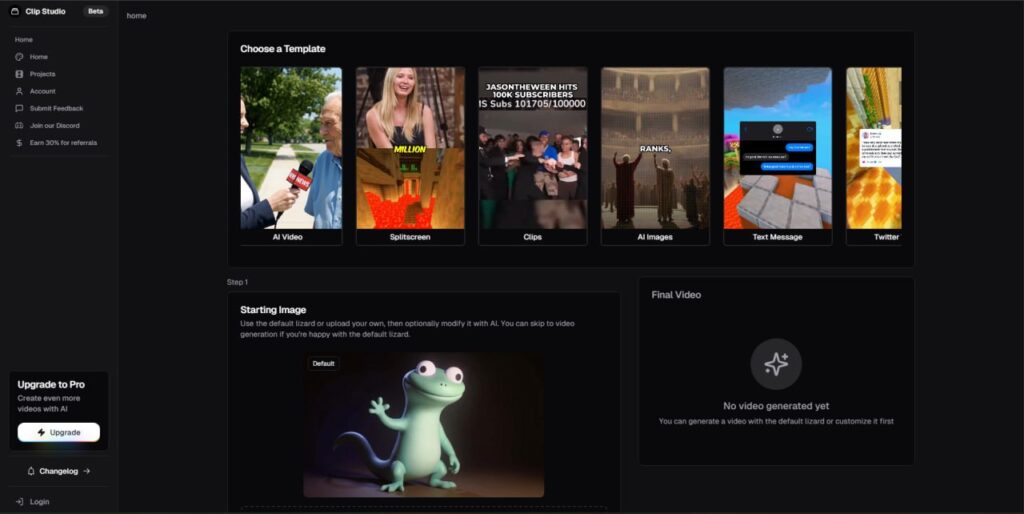
Before generating a video, Clip Studio lets you establish a visual anchor. You can start with their default character asset (like their signature animated lizard) or drag and drop your own image file (supporting PNG, JPG, or JPEG formats up to 10MB). From there, you can prompt the AI to customize the base image—adding specific clothing, jewelry, hairstyles, or precise artistic aesthetics.
- Why it matters: Visual consistency is critical when building a recognizable faceless brand or digital persona. Instead of getting stuck with random, mismatched AI outputs frame-by-frame, this feature allows you to lock in the exact look, vibe, and style of your character before a single frame of video is rendered.
2. Automated Multi-Angle Shot Planning
One of Clip Studio’s standout engineering feats is its automated Shot Plan Generator. Instead of creating a single flat, panning movement, the AI automatically maps out a structural timeline dividing an 8-second video into multiple precise segments. It explicitly programs advanced camera techniques to keep viewers engaged:
- 0–2 seconds: Low-angle wide shots featuring crane drops and dynamic parallax effects from background elements.
- 2–4 seconds: Extreme close-ups (ECU) mapped at a 10-to-15 degree dutch tilt with sudden micro push-ins to emphasize facial expressions.
- 4–6 seconds: Shoulder-height 180-degree arc tracking and clockwise orbit shots that cut precisely on major audio shifts.
- 6–8 seconds: A cinematic hero dolly-out combined with a slight upward boom, finishing with a confident hold and stylized shutter-drag motion blur.
- Why it matters: Short-form social media audiences have notoriously short attention spans. By forcing distinct visual changes and structural camera pushes every 2 seconds, Clip Studio vastly improves viewer retention rates and prevents users from scrolling away.
3. Integrated Rhythmic Voiceovers & Audio Syncing
Clip Studio pairs its visual generation directly with audio creation. Users can input deep, rhythmic scripts (such as spoken dialogue, rap lyrics, or narrative commentary) that the AI reads with a natural, confident cadence. The background music—ranging from high-energy trap-style beats to moody cinematic tones—is automatically blended with the vocal track.
- Why it matters: Audio timing can make or break a short video’s virality. Clip Studio automatically syncs its visual transitions (like whip pans and match cuts) exactly to the heavy snare hits or 808 drum drops of the audio track, delivering polished, music-video-quality energy instantly.
4. High-Speed Processing & Generation Pipeline
The backend pipeline is highly optimized for rapid deployment. Modifying a base image takes approximately 6 seconds, while rendering a fully-animated, multi-angle, audio-synced 8-second video takes roughly 60 seconds.
- Why it matters: To win the social media algorithm game, consistency and high volume are mandatory. Because Clip Studio allows you to test concepts, generate variations, and export finalized content inside a single minute, creators can scale their production to multiple posts a day without burning out.
Step-by-Step: How to Generate a Video on Clip Studio
Creating a clip on the platform is completely frictionless and follows a structured 4-step sequence:
- Establish Your Character Model:Takes ~6 seconds.Select the default avatar or upload your own JPEG/PNG file (up to 10MB). Write a brief text prompt to modify the character’s clothing, gear, or aesthetic features (Costs 1 Credit).
- Input Your Core Script & Audio Voiceover:Custom Text Generation.Type your voiceover script or lyrics into the generator window. Choose your preferred backing track style (like high-energy trap beats) to set the baseline rhythmic pacing.
- Configure the Multi-Angle Shot Plan:Automated Framing Sequence.The AI automatically outlines a detailed 0-to-8 second timeline layout, assigning cinematic cuts, crane angles, and tracking motions dynamically across 2-second clips.
- Render, Enhance, and Export:Takes ~60 seconds.Click ‘Generate Video’ to process the final file. The platform completely renders the 8-second video clip with fully synced transitions and master-mixed audio paths (Costs 100 Credits).
Clip Studio Pros & Cons
To give you a completely transparent look at the platform, we have broken down where Clip Studio excels and where it falls short compared to traditional video editing suites.
The Pros (What We Love)
- High-Retention Camera Movement: The automated 2-second camera angle switches (crane drops, orbits, dutch tilts) completely solve the retention problem that plagues generic AI videos. It keeps the viewer’s eyes glued to the screen.
- Flawless Rhythmic Syncing: You don’t have to waste time manually adjusting audio tracks. The AI inherently aligns fast motion cuts and camera whip pans directly to the heavy beat drops of your selected backing tracks.
- Ultra-Fast Workflow Execution: Going from a raw text prompt or simple image file to a fully-rendered, multi-angle video in exactly 60 seconds is an incredible efficiency boost for high-volume content creators.
- Zero Technical Barrier to Entry: Because the UI functions completely on text inputs and structural templates, you don’t need any prior background in complex video editing timelines, lighting configurations, or sound engineering.
- Generous Lucrative Affiliate Structure: The built-in referral system offers a 30% lifetime recurring commission, making it a great option for digital marketers looking to build a secondary passive revenue stream while reviewing the tool.
The Cons (What to Consider)
- Rigid Video Length Constraints: The platform is purpose-built for ultra-short viral formats, meaning you are currently locked into a maximum rendering limit of 8 seconds per generated clip. If you want to make longer 60-second compilations, you will need to stitch multiple clips together in an external editor.
- Heavy Credit Consumption Matrix: While modifying a character style costs just 1 credit, generating a full 8-second multi-angle video eats up 100 credits at once. Your free 20 signup credits will disappear fast if you start experimenting heavily.
- Lack of “Set-and-Forget” Posting Autopilot: Unlike some enterprise-level social automation platforms that can schedule out months of content with 1 click, Clip Studio requires you to manually generate and finalize each individual project clip sequentially before queueing it up.
- Limited Niche Diversity: The core visual engine relies heavily on high-energy, stylized, and animated avatars (like their default cartoon rapper lizard) paired with heavy trap beats. If your brand voice leans toward hyper-corporate, educational, or soft storytelling, the default templates might feel too aggressive out of the box.
The Verdict
If your primary goal is to churn out high-energy, algorithmic, face-hidden shorts for TikTok or Reels, the massive time saved by the automated camera planning makes it worth every credit. However, creators looking for highly flexible, minute-long, deep-narrative documentaries will find the 8-second framework limiting.