
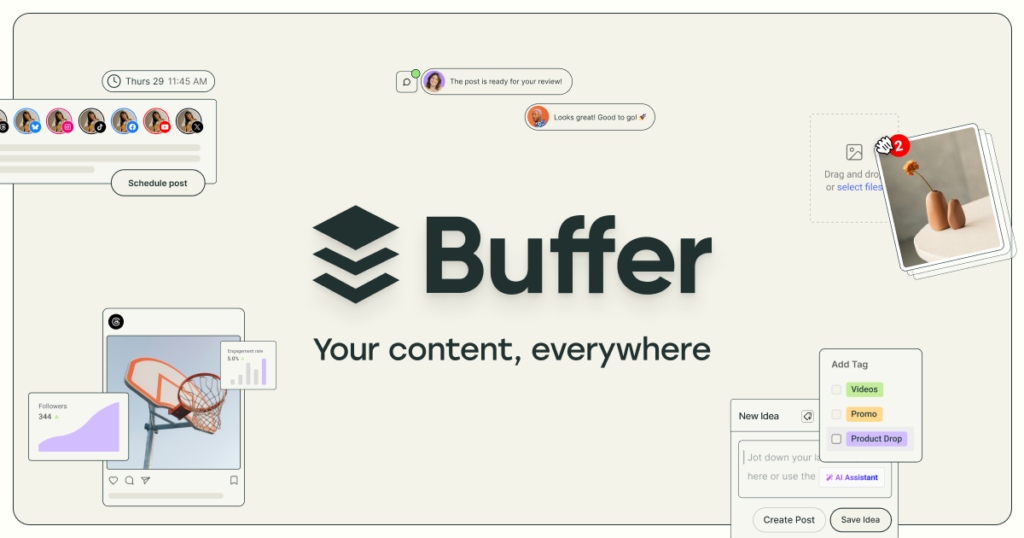
Tired of Juggling Social Media Accounts? Buffer Might Be Your Solution
Managing a consistent presence across Facebook, Instagram, TikTok, LinkedIn, and X can feel like a full-time job. Between crafting posts, remembering optimal times, and analyzing performance, many individuals and small businesses struggle to keep up. This is where Buffer steps in, aiming to simplify social media management into one intuitive platform.
In this comprehensive Buffer review, we’ll explore its core features, analyze its pricing structure, weigh its pros and cons, and compare it to key alternatives. By the end, you’ll have a clear understanding of whether Buffer is the right tool to streamline your social media efforts and boost your online presence.
What is Buffer?
Buffer is a social media management platform designed to help individuals, small businesses, and marketing teams efficiently schedule, publish, analyze, and engage with content across various social networks. Founded in 2010, Buffer has built a reputation for its user-friendly interface and reliable scheduling capabilities, making it a go-to choice for those seeking a straightforward approach to social media.
It falls primarily into the **social media scheduling and analytics** category, providing a centralized workspace for content planning and distribution. Buffer supports a wide array of platforms including Facebook, Instagram, TikTok, LinkedIn, Threads, Bluesky, YouTube Shorts, Pinterest, Google Business Profile, Mastodon, and X, ensuring broad reach for your content.
Key Features: A Detailed Breakdown
Buffer offers a suite of features meticulously crafted to streamline social media workflows and enhance productivity. Here’s a closer look at its most impactful functionalities:
Post Scheduling & Queue Management
Buffer’s core strength lies in its robust post scheduling. Users can plan and queue posts for multiple social channels from a single dashboard, setting custom publishing times for each platform. This ensures a consistent online presence without the need for manual, real-time posting. It supports scheduling across numerous platforms including Facebook, Instagram, TikTok, LinkedIn, Threads, Bluesky, YouTube Shorts, Pinterest, Google Business Profile, Mastodon, and X. For example, you can craft a single message and adapt it slightly for X, then schedule a visually rich version for Instagram, all from one place.
Content Calendar
The drag-and-drop content calendar provides a visual overview of all upcoming posts and campaigns. This feature is crucial for organized content planning, allowing users to see their entire publishing schedule at a glance. You can easily adjust posting times, move content around, or identify gaps in your strategy, ensuring your content flow remains consistent and strategic.
Analytics Dashboard
Understanding content performance is vital for optimization. Buffer’s analytics dashboard tracks key metrics such as engagement (likes, comments, shares), reach, impressions, top-performing posts, and audience growth. This data helps users identify what resonates with their audience, allowing them to refine their content strategy based on real-world performance rather than guesswork. While not as deep as some enterprise solutions, it provides essential insights for most small to medium-sized operations.
Team Collaboration
For teams, Buffer facilitates seamless collaboration. It allows users to invite team members, assign specific roles (e.g., content creator, editor, approver), and manage approval workflows for posts. Team members can comment on drafts within Buffer, streamlining the feedback process and ensuring all content aligns with brand guidelines before publishing. This feature is particularly valuable for agencies or marketing departments with multiple contributors.
AI Assistant
In a world where content creation needs to be fast and efficient, Buffer’s integrated AI Assistant is a significant asset. This tool helps users brainstorm ideas, rewrite existing content for different platforms, and craft platform-specific posts. For instance, you could input a blog post title, and the AI could suggest several X threads or Instagram captions, significantly enhancing content creation efficiency and reducing writer’s block.
Community Inbox
Engaging with your audience is crucial for building a strong community. Buffer’s Community Inbox centralizes comments and mentions from various social media accounts into one simple dashboard. This allows users to triage and respond to interactions quickly, speeding up audience engagement and ensuring no customer query or comment goes unnoticed. It helps maintain a responsive and active brand presence.
Start Page (Link-in-Bio)
For platforms like Instagram and TikTok, the “link-in-bio” is prime real estate. Buffer offers a customizable Start Page builder, allowing users to create a personalized landing page. This page can host multiple links to their website, latest content, products, or other social profiles, turning a single bio link into a powerful hub for their audience.
Content Previews
A common mistake in social media is publishing content that doesn’t look quite right on a specific platform. Buffer addresses this with content previews, allowing users to see exactly how their posts will appear on different social media platforms (e.g., X, Instagram, Facebook, TikTok, YouTube, Threads, Bluesky, Pinterest, Mastodon, Google Business Profile) before publishing. This ensures consistency, helps catch formatting errors, and maintains a professional brand image.
Pricing & Plans
Buffer offers a tiered pricing structure designed to accommodate different needs, from solo creators to agencies. The pricing model is primarily “per-channel,” meaning costs scale with the number of social accounts you connect. Opting for annual billing typically results in lower prices.
Free Plan
- Price: $0
- Key Features: Connect up to 3 social channels, schedule up to 10 posts per channel (up to 30 total posts if 3 accounts are connected), basic analytics.
- Best for: Solo creators, individuals testing the platform, very small businesses with minimal social media needs.
Essentials Plan
- Price: $5 per channel per month (billed annually) or $6 per channel per month (billed monthly).
- Key Features: Unlimited scheduled posts per channel, unlimited ideas, 1 user account, AI Assistant, advanced analytics, community inbox, hashtag manager, first comment scheduling, API access.
- Best for: Solo marketers, small businesses, and content creators needing more robust scheduling and analytics without team collaboration.
Team Plan
- Price: $10 per channel per month (billed annually) or $12 per channel per month (billed monthly).
- Key Features: All Essentials features, plus unlimited team members, access levels, and content approval workflows.
- Best for: Small to medium-sized marketing teams, agencies managing a few clients, organizations requiring collaboration and approval processes.
Agency Plan
- Price: Starts at $100 per month (flat rate for 10 channels), with additional channels costing $6 each.
- Key Features: Tailored for agencies, includes all Team plan features, optimized for managing multiple clients and accounts efficiently.
- Best for: Marketing agencies and larger businesses managing a significant number of social accounts for various clients or brands.
Buffer’s per-channel pricing can be more cost-effective for teams managing many channels with fewer individual users, especially when compared to seat-based pricing models offered by some competitors. There are no significant hidden costs, and the pricing structure is transparent.
Pros and Cons
Buffer’s strengths lie in its simplicity and reliability, but it also has limitations that users should consider. Here’s a balanced view:
✅ Pros
- Exceptional Ease of Use: Buffer is consistently praised for its clean, modern, and intuitive interface. New users can often schedule posts within minutes, making onboarding remarkably quick.
- Reliable Post Scheduling: The core scheduling functionality is highly dependable, ensuring content is published precisely as planned across all connected social channels, minimizing manual oversight.
- Generous Free Plan: One of Buffer’s standout advantages is its robust free tier, allowing users to connect up to 3 channels and schedule 10 posts per channel. This offers substantial utility for individuals and small operations to start without financial commitment.
- Transparent Pricing Model: Users appreciate Buffer’s clear, per-channel pricing with no hidden fees. This model can be particularly economical for teams with many users managing fewer channels.
- Broad Multi-Platform Support: Buffer supports a wide array of popular and newer social media platforms, including Threads, Bluesky, and TikTok, enabling extensive content distribution from a single hub.
- Helpful AI Assistant: The integrated AI Assistant is effective for brainstorming ideas, rewriting content, and crafting platform-specific posts, significantly enhancing content creation efficiency.
- Robust Mobile App: Buffer offers a fully functional mobile app, allowing users to manage accounts, approve content, and post on the go, providing flexibility for busy schedules.
❌ Cons
- Limited Advanced Analytics: Compared to more comprehensive tools, Buffer’s analytics can lack depth. It provides essential metrics but may not offer detailed insights into audience demographics, paid social integration, competitor benchmarking, or cross-channel reporting, which often requires a separate Buffer Analyze subscription.
- Absence of Social Listening: Buffer does not include dedicated social listening or monitoring features. Users cannot track brand mentions, keywords, or conversations across social media directly within the platform, requiring external tools for comprehensive brand monitoring.
- Costly for Many Channels: While transparent, the per-channel pricing model can become expensive for businesses managing a large number of social accounts across many platforms. For example, an agency with 20 client accounts, each needing 5 channels, would incur significant monthly costs.
- No Optimal Posting Time Suggestions: Buffer does not inherently suggest the best times to post based on audience activity, instead offering random times or requiring users to set their own schedules. Users often expect this data-driven feature from a social media management tool.
- Fewer Advanced Features: Buffer’s deliberate focus on simplicity means it lacks some advanced features found in competitors, such as granular approval workflows, bulk scheduling via CSV, or deep enterprise-level customization and integrations.
Real-World Use Cases
Buffer excels in specific scenarios, making it an ideal choice for particular users and teams:
If you’re a Solo Entrepreneur or Small Business Owner…
You need to maintain an active social media presence but have limited time and budget. Buffer’s **Free Plan** or affordable **Essentials Plan** allows you to schedule posts across your key channels (e.g., Instagram, Facebook, LinkedIn) efficiently. The intuitive interface means you can set up your content calendar in minutes, freeing you up to focus on other business priorities. The AI Assistant can also quickly help you draft engaging captions for your products or services.
If you’re a Content Creator or Influencer…
Consistency is key to growth. Buffer helps you schedule your YouTube Shorts, TikToks, Instagram posts, and X updates ahead of time. The **Content Calendar** lets you visualize your entire content pipeline, ensuring a steady stream of engaging material. The **Start Page** feature provides a customizable link-in-bio hub, directing your audience to your latest content or collaborations.
If you’re a Small Marketing Team or Agency…
Coordinating social media efforts across multiple team members or clients can be complex. Buffer’s **Team Plan** facilitates collaboration with unlimited users, roles, and content approval workflows. Your team can draft posts, get manager approval, and schedule content for various client accounts, all from a centralized dashboard. The per-channel pricing can also be advantageous if you have a few clients with many channels each.
If you’re a Non-Profit Organization…
Non-profits often rely on social media for outreach and fundraising but operate with tight budgets. Buffer’s ease of use and generous free plan make it accessible. You can schedule appeals, share success stories, and promote events across Facebook, X, and LinkedIn, maintaining a consistent message without needing dedicated social media staff or expensive tools.
How It Compares to Alternatives
While Buffer excels in simplicity, it’s important to understand how it stacks up against other popular social media management tools:
Buffer vs. Hootsuite
- Buffer Wins: Simplicity and ease of use are Buffer’s strong points. Its interface is generally cleaner and less cluttered, making it quicker to learn for beginners. The free plan is also more generous for basic scheduling.
- Hootsuite Wins: Hootsuite offers a more feature-rich solution, especially for larger teams and agencies. It boasts advanced reporting, more robust social listening and monitoring capabilities, and integrations with a wider range of social media platforms and third-party apps. If you need deep analytics and comprehensive monitoring, Hootsuite is often preferred.
Buffer vs. Sprout Social
- Buffer Wins: Price and simplicity. Buffer is significantly more affordable, particularly for smaller operations, and maintains a focus on core scheduling and engagement without overwhelming users with complex features.
- Sprout Social Wins: Sprout Social is a premium, enterprise-level tool offering best-in-class analytics and reporting, advanced social listening, CRM integrations, and sophisticated tasking tools. It’s ideal for larger businesses and agencies that require deep insights, extensive collaboration features, and a comprehensive suite of social media tools, but comes at a much higher price point.
Buffer vs. Later
- Buffer Wins: Broader platform support including newer networks like Threads and Bluesky, and a more generalized approach to social media management. Its AI Assistant is also a strong differentiator for content creation.
- Later Wins: Later is often recommended for visual-first creators and DTC brands, particularly excelling with Instagram and TikTok. It offers strong visual planning tools, link-in-bio customization, and analytics specifically tailored for visual content. If Instagram is your primary channel, Later might offer a more specialized experience.
Who Should (and Shouldn’t) Use This Tool?
✅ Best for:
- Small Businesses & Entrepreneurs: Those needing an affordable, straightforward tool to manage social media efficiently without extensive training.
- Solo Marketers & Content Creators: Individuals looking for a clean interface to schedule posts, manage content calendars, and get basic analytics.
- Small Teams: Groups needing basic collaboration features, roles, and approval workflows without the complexity or cost of enterprise solutions.
- Users Prioritizing Simplicity: Anyone who values a minimalist, intuitive tool for consistent publishing over deep analytics or advanced features.
- Beginners in Social Media Management: Its ease of use makes it an excellent starting point for those new to using social media management platforms.
❌ Not ideal for:
- Large Enterprises: Organizations requiring complex integrations, advanced social listening, detailed competitor analysis, or highly customized workflows.
- Agencies with Extensive Reporting Needs: If comprehensive, in-depth reports, ROI justification, and advanced cross-channel analytics are critical, Buffer’s built-in analytics may fall short.
- Users Needing Social Listening: Those who require real-time monitoring of brand mentions, sentiment analysis, or keyword tracking will need a separate tool.
- Budget-Conscious Teams with Many Channels: While the per-channel pricing is transparent, it can become expensive for businesses managing a very large number of social accounts across many platforms.
- Users Demanding Optimal Posting Time Suggestions: If data-driven recommendations for the best times to post are a must-have, Buffer’s current offering may be disappointing.
Final Verdict
Buffer remains a top contender in the social media management space, particularly for those who value simplicity, reliability, and an intuitive user experience. Its robust scheduling, helpful AI Assistant, and generous free plan make it an excellent choice for solo creators, small businesses, and small marketing teams looking to streamline their social media presence without being overwhelmed by excessive features.
While it may not offer the deep analytics or social listening capabilities of more expensive, enterprise-grade platforms like Sprout Social or Hootsuite, Buffer excels at its core mission: making social media publishing easy and consistent. Its transparent, per-channel pricing model can be a significant advantage for specific team structures, offering a cost-effective solution for managing multiple channels efficiently.
For anyone seeking a straightforward, dependable tool to manage their social media scheduling, content calendar, and basic analytics, Buffer is a highly recommended solution. It’s a solid 8.5/10 for its target audience, delivering exactly what it promises with exceptional user-friendliness.
Start Managing Your Social Media with Buffer →
FAQ
What social media platforms does Buffer support?
Buffer supports a wide range of platforms, including Facebook, Instagram, TikTok, LinkedIn, Threads, Bluesky, YouTube Shorts, Pinterest, Google Business Profile, Mastodon, and X. This extensive support allows users to manage a diverse online presence from a single dashboard.
Is there a free version of Buffer?
Yes, Buffer offers a generous Free Plan. It allows users to connect up to 3 social channels and schedule up to 10 posts per channel. This plan is ideal for individuals or very small businesses to get started with social media scheduling without any cost.
How does Buffer’s pricing work?
Buffer’s pricing is primarily based on the number of social channels you connect. Plans like Essentials and Team are priced “per channel per month,” with discounts for annual billing. The Agency Plan starts at a flat rate for 10 channels, with additional channels at a set cost. This model can be cost-effective for teams with many users but fewer channels.
Does Buffer offer social listening or monitoring?
No, Buffer does not include dedicated social listening or monitoring features within its core platform. If you need to track brand mentions, keywords, or conversations across social media in real-time, you would need to use a separate tool in conjunction with Buffer.
Can teams collaborate on Buffer?
Yes, Buffer offers robust team collaboration features, particularly in its Team and Agency plans. These plans allow for unlimited team members, role assignments, access levels, and content approval workflows, making it easy for multiple people to contribute to and manage social media content.
How does Buffer compare to Hootsuite or Sprout Social?
Buffer is often praised for its simplicity and ease of use, making it ideal for small businesses and solo creators. Hootsuite and Sprout Social, while more expensive, offer deeper analytics, more advanced social listening, and a wider array of integrations, catering more to larger teams and enterprises with complex social media needs.