
OpenMusic AI Review: Your All-in-One AI Music Studio?
Creating original, studio-quality music often demands extensive training, expensive equipment, and a significant time investment. For content creators, aspiring artists, or businesses needing custom soundtracks, this barrier can feel insurmountable. This is where OpenMusic AI steps in, promising to democratize music production through artificial intelligence.
In this comprehensive **OpenMusic AI review**, we’ll explore exactly what this platform offers, from generating full songs and lyrics to creating synchronized music videos. We’ll break down its key features, analyze its pricing plans, weigh its pros and cons, and compare it against top alternatives. By the end, you’ll have a clear understanding of whether OpenMusic AI is the right tool to elevate your creative projects.
Ready to discover if OpenMusic AI can transform your musical ideas into reality?
What is OpenMusic AI?
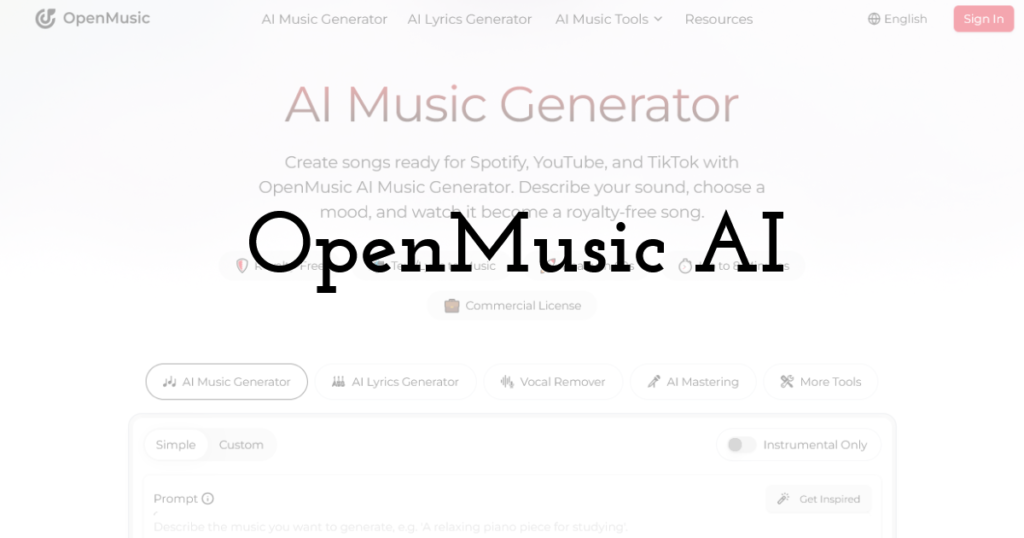
OpenMusic AI is a comprehensive online platform that leverages artificial intelligence to streamline and enhance music creation. It enables users to generate full songs, lyrics, and even synchronized music videos simply by describing their desired sound or mood through text prompts. The tool provides an integrated suite for audio production, including vocal removal, stem separation, and AI mastering, making it possible to produce release-ready, monetizable music within a single environment. OpenMusic AI caters to a wide range of creators, from hobbyists to professionals, by offering an accessible and efficient workflow for generating unique, royalty-free compositions.
Key Features: A Detailed Breakdown
OpenMusic AI positions itself as an all-in-one music creation toolkit, packing a robust set of features designed to cover the entire creative pipeline. Here’s a closer look at its core functionalities and what makes them stand out.
AI Music Generator
The **AI Music Generator** is the core of OpenMusic AI. Users can input text descriptions, select desired moods, and choose from a wide array of genres to create unique, royalty-free tracks. This feature is particularly powerful for those without formal musical training, as it bypasses the need for composing melodies or arranging instruments. For instance, you could prompt it to “create a chill lo-fi track with a melancholic piano melody and subtle drum beat,” and the AI will generate a full song. The output is designed to be commercially ready, simplifying the process of getting new music onto platforms like Spotify or YouTube.
AI Lyrics Generator
Songwriting can be a significant hurdle for many creators. The **AI Lyrics Generator** helps overcome this by transforming your ideas or themes into complete song lyrics within seconds. Whether you need verses for a love song or a narrative for an epic ballad, you can provide a concept like “a story about overcoming adversity” and receive structured lyrics. This feature is a valuable aid for brainstorming and developing lyrical content, especially when facing writer’s block.
AI Singing Voice Generator
Beyond instrumentals and lyrics, OpenMusic AI also offers an **AI Singing Voice Generator**. This allows users to add vocals to their generated tracks, providing options to customize the voice’s style and tone. This feature is crucial for creating complete songs, enabling users to hear their lyrics brought to life without needing to record actual vocalists. It offers a quick way to produce demos or even final tracks with a vocal presence.
Vocal Remover/Stem Splitter
The **Vocal Remover/Stem Splitter** is a versatile tool for audio manipulation. It can isolate vocals from an existing track, creating instrumentals perfect for remixes, karaoke, or background music. Additionally, it can separate a full song into individual stems—such as vocals, drums, bass, and other instruments. This capability is invaluable for producers who want to remix existing tracks, learn from professional mixes, or create custom backing tracks for live performances. For example, you can upload a popular song and extract just the drum track for practice.
AI Mastering
Achieving professional-grade audio quality typically requires specialized mixing and mastering engineers. OpenMusic AI’s **AI Mastering** feature aims to democratize this process. It applies professional mixing, mastering, and production quality to your AI-generated tracks, ensuring they sound crisp, detailed, and studio-ready. This is critical for music intended for commercial release, as poorly mastered tracks often sound amateurish on streaming platforms. The AI analyzes the track’s dynamics, frequency balance, and loudness to optimize it for various listening environments.
AI Music Video Generator
In today’s visual-first content world, a music video is almost as important as the song itself. The **AI Music Video Generator** is a unique offering that creates synchronized music videos by analyzing the music’s tempo, rhythm, melody, and emotional tone. It translates these musical elements into dynamic visual sequences. This feature saves creators immense time and resources, eliminating the need for complex video editing software or hiring videographers. Imagine generating a high-energy EDM track and having an accompanying video with flashing lights and dynamic transitions automatically created.
AI Music Edit Tools
While AI generates the initial content, fine-tuning is often necessary. OpenMusic AI provides various **AI Music Edit Tools** for refining melodies, converting audio to MIDI, adjusting speed, and other creative requirements. These tools give users a degree of control over the generated content, allowing for personalized adjustments that tailor the AI’s output to specific visions. For instance, you might want to slightly alter a melody or change the tempo of a generated track to better fit a specific project.
AI Song Cover Generator
A professional song cover is essential for attracting listeners on streaming platforms. The **AI Song Cover Generator** helps users create appealing and professional artwork for their tracks. This feature ensures that your music not only sounds good but also looks polished and ready for release, completing the package for commercial distribution.
Pricing & Plans
OpenMusic AI operates on a freemium model, offering several subscription tiers designed to accommodate different levels of usage. All plans are available with monthly or annual billing, with annual subscriptions typically providing a significant discount. It’s important to note that generating a single song costs **2 credits** across all plans.
Free Plan
- Credits: 30 Credits/year
- Music Generations: 15 Music Generations/year
- Key Features: Basic AI Music Generator, AI Lyrics Generator, AI Music Video.
- Limitations: Does NOT include music downloads. Commercial License is only available with paid annual plans.
- Best For: Individuals looking to test the platform’s core functionalities and explore its capabilities without commitment. Not suitable for commercial use or downloading generated tracks.
Starter Plan
- Price (Monthly): Starts at $14.99
- Price (Annually): $125.92/year (billed yearly, saving money over monthly)
- Credits: 2,400 Credits/year
- Music Generations: 1,200 Music Generations/year
- Key Features: Pro AI Music Generator, AI Lyrics Generator, AI Music Video, Commercial License, AI Music Edit Tools, Pro AI Song Cover Generator.
- Downloads: 1,000 Download times for previously generated songs.
- Support: Email Support.
- Best For: Aspiring artists, content creators, and hobbyists who need royalty-free music for personal projects or small-scale commercial use, requiring downloads and more extensive generation capabilities.
Hobby Plan
- Price (Annually): $251.92/year (billed yearly)
- Credits: 6,000 Credits/year
- Music Generations: 3,000 Music Generations/year
- Key Features: Pro AI Music Generator, AI Lyrics Generator, AI Music Video, Commercial License, AI Music Edit Tools, Pro AI Song Cover Generator.
- Downloads: Unlimited Downloads.
- Support: 24/7 email support.
- Best For: Dedicated hobbyists and growing content creators who frequently need custom music, valuing unlimited downloads and enhanced support.
Professional Plan
- Price (Annually): $419.92/year (billed yearly)
- Credits: 14,400 Credits/year
- Music Generations: 7,200 Music Generations/year
- Key Features: Pro AI Music Generator, AI Lyrics Generator, AI Music Video, Commercial License, AI Music Edit Tools, Pro AI Song Cover Generator.
- Downloads: Unlimited Downloads.
- Support: 24/7 email support.
- Best For: Small businesses, marketers, or professional content creators with high volume music needs for diverse commercial projects.
Studio Plan
- Price (Monthly): $129.99 (annual pricing not explicitly detailed as a single upfront cost, but implied)
- Credits: 40,800 Credits/year
- Music Generations: 20,400 Music Generations/year
- Key Features: Pro AI Music Generator, AI Lyrics Generator, AI Music Video, Commercial License, AI Music Edit Tools, Pro AI Song Cover Generator.
- Downloads: Unlimited Downloads.
- Support: 24/7 email support.
- Best For: Large agencies, production studios, or high-volume businesses requiring extensive music generation and full commercial rights.
Note: Commercial licensing is explicitly included with paid annual plans. Monthly subscribers should always confirm the current licensing terms at checkout to ensure compliance for commercial use.
Pros and Cons of OpenMusic AI
Like any powerful tool, OpenMusic AI comes with its strengths and weaknesses. Understanding these can help you determine if it aligns with your specific creative needs.
✅ Pros
- ✅ 100% Royalty-Free and Commercial Ready: All tracks generated on paid plans come with a commercial license, allowing confident use across various platforms (Spotify, YouTube, TikTok) without copyright concerns. This is a major advantage for monetized content.
- ✅ All-in-One Creation Toolkit: It consolidates multiple AI music tools—song generation, lyrics writing, vocal removal, stem separation, mastering, and music video generation—into a single platform, significantly streamlining the creative workflow.
- ✅ Studio-Quality Audio: AI-generated tracks are designed to be crisp, detailed, and studio-ready, benefiting from professional mixing and mastering quality. This means less post-production work for users.
- ✅ Accessibility and User-Friendly Interface: The platform is intuitive and easy to navigate, lowering the barrier to entry for individuals without technical music production skills or expensive equipment.
- ✅ Speed of Production: OpenMusic AI dramatically reduces production time, enabling rapid content iteration and quick generation of both music and synchronized videos. You can go from idea to track in minutes.
- ✅ Longer Track Generation: Unlike many competitors that often cap tracks at 2-4 minutes, OpenMusic AI can generate compositions up to 8 minutes, offering greater flexibility for longer content.
- ✅ Versatile Genre Selection: The platform supports a wide range of genres and moods, from country to EDM, catering to diverse creative requirements and preferences.
❌ Cons
- ❌ Limited Free Plan: The free plan does not include music downloads or commercial licensing, making it suitable only for initial testing rather than full production workflows or commercial deployment.
- ❌ Lack of DAW-Level Control: While comprehensive, OpenMusic AI offers less granular control than a traditional Digital Audio Workstation (DAW). This might not be ideal for professional engineers or producers who require precise, detailed control over every aspect of their tracks.
- ❌ Concerns about Prompt Accuracy and Editing Reliability: Some independent reviews have raised concerns regarding the accuracy of AI-generated lyrics and the reliability of certain editing functions. This suggests that outputs may sometimes require significant manual refinement.
- ❌ Difficulty with Highly Personalized Compositions: Users seeking a completely unique and personalized touch might find it challenging to achieve their exact vision, as AI-generated music relies on models rather than frame-by-frame precision in composition.
- ❌ Small Sample of User Reviews: The Trustpilot rating of 2.8 out of 5 is based on a very small sample of five reviews. This limited data may not reliably represent overall user sentiment or the platform’s true performance for a wider user base.
Real-World Use Cases for OpenMusic AI
OpenMusic AI’s comprehensive toolkit makes it suitable for a variety of creators and professionals. Here are a few specific scenarios where this tool truly shines:
If you’re a Content Creator (YouTuber, TikToker, Podcaster)
You constantly need fresh, engaging, and royalty-free background music or sound effects for your videos and episodes. OpenMusic AI allows you to quickly generate custom tracks that perfectly match the mood and tempo of your content, without worrying about copyright strikes. Imagine needing a suspenseful track for a gaming montage or an upbeat jingle for your podcast intro – OpenMusic AI can deliver it in minutes, often with an accompanying music video.
If you’re an Aspiring Musician or Hobbyist
You have musical ideas but lack the instruments, software, or technical skills to bring them to life. OpenMusic AI provides an accessible entry point into music production. You can experiment with different genres, generate full songs, write lyrics with AI assistance, and even create singing vocals. It’s an excellent way to prototype song ideas, create demos, or simply enjoy the process of making music without a steep learning curve.
If you’re a Small Business or Marketer
Your business needs custom background music for advertisements, presentations, corporate videos, or in-store ambiance. Licensing existing music can be expensive and complex. With OpenMusic AI, you can generate unique, royalty-free soundtracks tailored to your brand’s message and tone, ensuring consistency and avoiding recurring licensing fees. For example, a coffee shop could generate a cozy jazz track for its ambiance, or a tech startup could create an energetic, modern score for its product launch video.
If you’re a Game Developer
Creating immersive game environments often requires a diverse range of custom background music, sound effects, and thematic scores. OpenMusic AI can rapidly generate unique compositions for different levels, character themes, or in-game events. This saves significant time and budget compared to commissioning composers, allowing developers to iterate quickly and maintain creative control over their game’s audio landscape.
How It Compares to Alternatives
The AI music generation space is growing rapidly, with several platforms offering unique strengths. Here’s how OpenMusic AI stacks up against some of its notable competitors:
OpenMusic AI vs. Suno
- OpenMusic AI: Offers a more comprehensive toolkit beyond just song generation, including stem splitting, AI mastering, and integrated music video creation. It allows for longer track generation (up to 8 minutes) and provides more detailed editing tools.
- Suno: Renowned for its incredibly fast, one-click song generation, often including integrated vocals and lyrics. Suno excels at quickly producing complete, catchy songs, making it a simpler and faster choice for immediate, full-song output, though it might offer less granular control over individual elements.
OpenMusic AI vs. Udio
- OpenMusic AI: Provides a broader suite of production tools, covering mastering, stem separation, and music video generation within a single platform. Its focus is on a complete, integrated workflow.
- Udio: Stands out for its focus on detailed revisions and offering users more control over the iterative song generation process. If fine-tuning specific sections or experimenting with variations is a priority, Udio might offer a more responsive editing experience for the core musical composition.
OpenMusic AI vs. Yolly AI
- OpenMusic AI: Combines text-to-music, lyrics, singing voice, and a unique AI music video generator, aiming for an all-encompassing production environment.
- Yolly AI: Specializes in transforming text or lyrics into complete, royalty-free songs with vocals, rhythm, and harmony. It also offers instrumental generation and audio separation tools, making it a strong competitor for core song creation and separation, similar to OpenMusic AI’s audio-focused features.
OpenMusic AI vs. AIVA
- OpenMusic AI: Aims for broad genre versatility and a full production pipeline, suitable for modern content creation and commercial use across various styles.
- AIVA: (Artificial Intelligence Virtual Artist) is particularly strong for composing classical pieces or cinematic soundtracks. It can even export sheet music, making it ideal for film composers, classical musicians, or those needing orchestral-style compositions. For highly specific classical or film scoring needs, AIVA offers a more specialized approach.
In summary, OpenMusic AI differentiates itself by offering a more integrated, all-in-one solution that covers not just music and lyrics, but also advanced audio processing (like mastering and stem splitting) and visual content (music videos). While competitors might excel in specific niches like rapid full-song generation (Suno) or classical composition (AIVA), OpenMusic AI strives to be the comprehensive studio for the modern, multi-faceted creator.
Who Should (and Shouldn’t) Use This Tool?
Understanding the ideal user for OpenMusic AI is crucial for setting expectations and ensuring it aligns with your creative workflow.
Best for:
- ✅ **Content Creators (YouTubers, Podcasters, TikTokers):** Anyone needing a constant supply of unique, royalty-free background music and synchronized videos for their digital content.
- ✅ **Aspiring Artists & Hobbyists:** Individuals without formal musical training or access to expensive equipment who want to easily create full songs, demos, or simply experiment with music production.
- ✅ **Small Businesses & Marketers:** Companies looking for custom, brand-aligned soundtracks for ads, presentations, or corporate videos without the high costs and complexities of traditional music licensing.
- ✅ **Game Developers:** Those needing a quick and efficient way to generate diverse, custom compositions for game soundtracks and sound effects.
- ✅ **Users Prioritizing an All-in-One Workflow:** Individuals who appreciate having music generation, lyrics, vocal separation, mastering, and video creation integrated into a single platform.
Not ideal for:
- ❌ **Professional Music Producers/Engineers Requiring Granular Control:** Those who need precise, DAW-level control over every instrument, note, and mix parameter will find OpenMusic AI’s automated approach too restrictive.
- ❌ **Artists Seeking Highly Personalized, Human-Touched Compositions:** While powerful, AI-generated music may lack the unique, nuanced human touch that some artists require for deeply personal or experimental works.
- ❌ **Users with Zero Budget for Commercial Use:** The free plan is very limited and does not allow for music downloads or commercial licensing. Those needing free, commercially usable music will need to look elsewhere or upgrade.
- ❌ **Individuals Who Prioritize Extensive Community & Support:** While email support is offered, the platform’s relatively small user review base might suggest a less robust community forum or extensive tutorial library compared to more established tools.
Final Verdict
OpenMusic AI presents a compelling proposition for anyone looking to simplify and accelerate their music production process. Its all-in-one approach, encompassing AI music generation, lyrics, singing voices, stem splitting, mastering, and even synchronized music videos, truly sets it apart. For content creators, marketers, and aspiring artists, the ability to generate studio-quality, royalty-free music and visuals from simple text prompts is a significant time and cost saver. The platform’s user-friendly interface lowers the barrier to entry, making music creation accessible to a broader audience.
While the free plan is quite restrictive, the paid tiers offer substantial value, particularly with the inclusion of commercial licenses and unlimited downloads on higher plans. The extended track lengths (up to 8 minutes) are a notable advantage over many competitors. However, it’s important to acknowledge its limitations: professional producers might miss the granular control of a traditional DAW, and some users have reported inconsistencies with prompt accuracy for lyrics. The relatively small sample size of user reviews also means a full consensus on long-term reliability is still forming.
Overall, OpenMusic AI is a powerful, versatile tool that delivers on its promise of an integrated AI music studio. If you prioritize speed, an all-in-one workflow, and commercial readiness without needing micro-level control, it’s an excellent choice for generating unique audio and visual content. It earns a solid **8.2/10** for its comprehensive feature set, ease of use, and significant potential for various creative applications.
Try OpenMusic AI and Start Creating Music →
FAQ: OpenMusic AI
What is OpenMusic AI and what does it do?
OpenMusic AI is an all-in-one AI platform for generating royalty-free music, lyrics, singing voices, and synchronized music videos from text prompts. It also includes tools for vocal removal, stem separation, and AI mastering, aiming to simplify the entire music production process for creators.
Is the music generated by OpenMusic AI royalty-free and can I use it commercially?
Yes, all music generated on OpenMusic AI’s paid plans comes with a commercial license, making it 100% royalty-free and suitable for commercial use on platforms like Spotify, YouTube, and TikTok. The free plan, however, does not include commercial licensing or music downloads.
Does OpenMusic AI offer a free trial or a free plan?
OpenMusic AI offers a free plan that provides 30 credits per year, allowing for 15 music generations. However, this free plan does not include music downloads or commercial licensing, making it primarily for testing the platform’s basic features.
How does OpenMusic AI compare to other AI music generators like Suno or Udio?
OpenMusic AI differentiates itself with a more comprehensive, all-in-one toolkit that includes not just music and lyric generation, but also AI mastering, stem splitting, and integrated AI music video creation. While Suno and Udio might excel in rapid full-song generation or specific revision controls, OpenMusic AI focuses on providing a complete production pipeline within a single platform.
Can I edit the music generated by OpenMusic AI?
Yes, OpenMusic AI provides a suite of AI Music Edit Tools that allow you to refine melodies, convert audio to MIDI, adjust speed, and make other creative adjustments to your generated tracks. However, the level of control is not as granular as a traditional Digital Audio Workstation (DAW).
What kind of audio quality can I expect from OpenMusic AI?
OpenMusic AI aims to produce studio-quality audio. Its AI Mastering feature applies professional mixing and mastering techniques to ensure tracks sound crisp, detailed, and ready for commercial release, optimizing them for various listening environments.